How to Automate Home Lighting for Safer Nights
November 20, 2026
What Security Features Do Apartment Renters Really Need?
November 21, 2026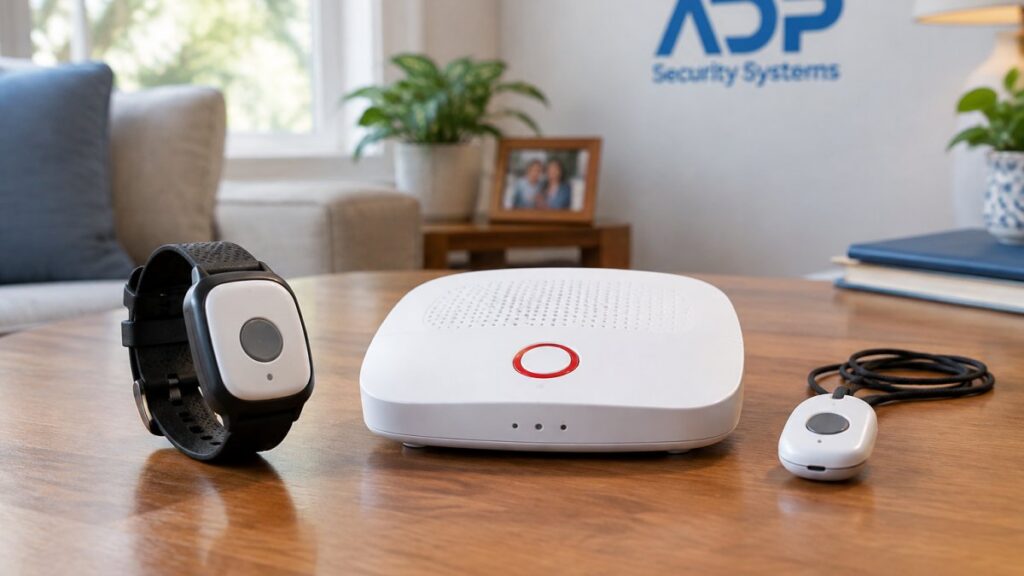
Last Updated: November 18, 2026
Quick Summary
Comparing wearable vs stationary medical alerts comes down to where the person spends most of their day: a stationary system keeps help within reach inside the home, while a wearable keeps it within reach everywhere else. Stationary units cost less and never need charging but only work within range of the base station, while wearables cover more ground but depend on battery life and a cellular network.
- Ask for a written quote listing equipment, activation, and monthly monitoring separately instead of accepting a phone estimate.
- Fall detection countdowns commonly run 20 to 60 seconds, and confirming that setting during setup is essential.
- A no-fee device usually dials a family contact rather than a professional monitoring center, shifting response work to relatives.
- Run a monthly 10-minute dry run, calling the monitoring center first so the test does not trigger a dispatch.
- Charge a wearable at the same time every night with the charger beside the bed to build a reliable routine.
Table of Contents
- Wearable vs Stationary Medical Alerts: The Core Differences
- Comparing Wearable vs Stationary Medical Alerts Cost
- Medical Alert Systems for Seniors With Fall Detection
- Medical Alert Bracelet or Necklace: Choosing a Wearable Format
- Medical Alert Systems for Seniors With No Monthly Fee
- In-Home vs On-the-Go: Matching the System to Daily Life
- Reliability, Maintenance, and Testing Protocols
- Get a Free Security Assessment for Your Medical Alert Setup
- Frequently Asked Questions
Wearable vs Stationary Medical Alerts: The Core Differences
Comparing wearable vs stationary medical alerts comes down to where the person spends most of their day.
Medical alerts are personal emergency response systems that connect a user to a monitoring center at the push of a button.
The trade-off is simple. Stationary units cost less and never need charging, but only work within range of the base station.
Comparing Wearable vs Stationary Medical Alerts Cost
Ask for a written quote that lists equipment, activation, and monthly monitoring separately, rather than accepting a phone estimate. Pricing depends on the equipment and the subscription plan chosen.
Equipment, Activation, and Monthly Monitoring Fees
Three line items make up most of the bill: equipment (base station, pendant, or wearable device), a one-time activation charge some providers collect and others waive, and monthly monitoring for 24/7 response staff, the cellular connection, and add-ons such as fall detection or GPS location updates. Compare total first-year cost instead of the monthly headline.
What Drives the Price Difference
Cellular connectivity and GPS tracking are the two biggest cost drivers for a wearable, since a device that must locate the user outdoors needs a cellular plan and a location service, both with ongoing costs. Fall detection adds sensor technology and monitoring logic. A stationary system skips all three, which is why it lands at a lower price point.
Medical Alert Systems for Seniors With Fall Detection
Fall detection changes the value calculation for both formats, but the feature is widely misunderstood. It is not a smarter help button, it is a separate sensor pipeline that decides, on its own, whether a fall occurred. Understanding that pipeline is the difference between trusting the feature and over-relying on it.
How the Technology Actually Works
A wearable with fall detection carries an accelerometer (and often a gyroscope) that samples motion many times per second. Firmware looks for a signature pattern: a brief free-fall or sharp downward acceleration, a sudden impact spike, then near-stillness.
Stationary base stations cannot feel body motion, so they rely on acoustic sensors or vibration to infer a fall in the room where the base sits.
What Fall Detection Cannot Do
- Slow collapses. A gradual slide down a wall or a controlled sit onto the floor often fails the impact threshold, so no alert fires. The user must still press the button.
- Falls broken by furniture. If a person catches a counter or chair on the way down, the deceleration profile can look like ordinary movement.
- Falls outside sensor range. A wearable left on the nightstand detects nothing. A base station detects only its own room.
Watch out: a fall detection feature that has never been tested is an assumption, not a safety net. Ask the monitoring center how to run a test fall (most have a scripted procedure) and confirm the countdown, the cancel button, and the auto-call all behave as advertised.
Format-by-Format Trade-offs
| Factor | Wearable Fall Detection | Stationary Fall Detection |
|---|---|---|
| Sensor location | On the body (pendant, wristband, watch) | In the base station, one room |
| Works away from home | Yes, if cellular coverage exists | No |
| False-positive rate | Higher during chores and exercise | Lower, but misses most real falls |
| Cancel window | Typically 20-60 seconds | Varies; often shorter |
| Best use | Solo livers, balance history, active users | Bathroom and bedroom backup layer |
How to Evaluate the Feature Before You Buy
Ask four questions of any provider. First, what triggers the auto-call, impact only, or impact plus stillness? Second, how long is the cancel window, and can it be adjusted? Third, does the device announce the countdown out loud? Fourth, does the monitoring center receive the fall event as a distinct alarm type, or as a generic button press?
Fall detection is a backup, not a replacement for the button. The strongest setup pairs a body-worn sensor with a well-placed base station, so a fall in the bathroom and a fall in the driveway are both covered. Learn how fall detection technology works before you rely on it in an emergency.
Medical Alert Bracelet or Necklace: Choosing a Wearable Format
Wearable formats split into two main styles, and the right one depends on habit and comfort. A necklace pendant sits close to the chest and is easy to press with either hand, which suits people who already wear a necklace. A bracelet or wristband works well for people who dislike anything around the neck.
The practical differences matter more than the style. A pendant can swing and catch on clothing, while a wristband can interfere with watch wear or get bumped during chores. If you are torn, this bracelet vs pendant comparison breaks down comfort, reach, and daily wear.
Medical Alert Systems for Seniors With No Monthly Fee
No-monthly-fee options exist, but they trade monitoring for independence.
The trade-off is response reliability. A professional monitoring center answers around the clock and dispatches emergency help, while a family contact may be asleep, at work, or out of range.
Our view: a no-fee device can work as a bridge for a senior who refuses a subscription, but it is not a substitute for monitored service.
In-Home vs On-the-Go: Matching the System to Daily Life
The right system follows the user’s routine, not the other way around. Someone who stays home most days and moves between the bedroom, bathroom, and kitchen gets full coverage from a stationary system with a well-placed base station. Someone who gardens, walks the dog, or drives to church needs a device that leaves the house with them.
When a Stationary System Makes Sense
A stationary system fits a person with limited mobility who spends most of the day within one floor of the home, and suits a household on a tight budget since equipment and monitoring cost less. Place the base station where the person spends the most time and add a second button for the bathroom, the room where falls are most common.
When a Wearable System Makes Sense
A wearable fits an active senior, a person who lives alone and wants coverage in the yard, or anyone who travels. Nationwide GPS and 4G coverage keep the device working away from home. Compare medical alert options for travelers if the user spends time away from home.
For a direct comparison of the two setups, see this breakdown of in-home vs mobile medical alert systems.
| Factor | Stationary System | Wearable System |
|---|---|---|
| Coverage area | Home only, within base station range | Home, yard, and on the go |
| Charging | None, plugs into power | Daily or every few days |
| Fall detection | Limited to one room | Travels with the user |
| Upfront cost | Lower | Higher |
| Monthly monitoring | Lower | Higher |
| Best for | Limited mobility, budget focus | Active users, travel, solo living |
Reliability, Maintenance, and Testing Protocols
Most medical alert failures are maintenance failures rather than equipment failures, such as a dead battery or a device left in a drawer. A written routine helps prevent them.
The Monthly Dry Run (10 Minutes)
- Call the monitoring center first. Tell them you are running a test and give your account number. Most centers log test calls and will not dispatch. Skipping this step is the most common cause of an accidental emergency response.
- Press the help button. Wait for the two-way voice to connect. Confirm the operator can hear you and you can hear them from across the room.
- Test from the farthest room. Walk to the opposite end of the house and repeat. If voice quality drops, the base station needs a better location or a second unit.
- Test the fall detection countdown if the device has it. Trigger a simulated fall per the manufacturer’s instructions, confirm the countdown is audible, and press cancel to verify it stops the call.
- Test the backup battery. Unplug the base station from the wall and confirm it stays powered. A backup battery that has never been load-tested is a guess.
- Log the date and result. A one-line entry is enough. A device that fails the same test twice is what tells you to call for service.
The Daily and Weekly Habits
A wearable needs a charging routine tied to an existing habit, not a reminder app the user may ignore.
Once a week, confirm the device is actually being worn and that the indicator light shows a charged, connected state. A low-battery beep ignored for three days is the most common failure mode we see, and it is entirely preventable with a fixed charging time.
Signal and Connectivity Checks
Cellular wearables depend on coverage, and coverage changes. A device that worked in the living room may drop in a basement, a metal-sided garage, or a rural stretch of road.
A device that has not sent a signal in weeks can look fine on the charger while being effectively offline. Ask any provider whether the system sends a supervisory signal to the monitoring center.
Water, Heat, and Physical Wear
Confirm the waterproof rating before anyone showers or bathes with the device on. A pendant rated for splashes is not the same as one rated for submersion, and the rating can degrade as gaskets age. Replace worn lanyards and bands, a broken clasp is how devices end up in a drawer. Keep the base station out of direct sun and away from heat sources, since high temperatures shorten backup battery life.
When to Call for Service
Call the provider if a test call fails twice, if the device will not hold a charge through a full day, if the voice connection is garbled from a normal distance, or if the fall detection countdown no longer sounds. A maintenance schedule written into the service agreement, with the provider responsible for confirming the device is live, is worth more than a lower monthly rate with no follow-up.
Get a Free Security Assessment for Your Medical Alert Setup
Choosing between wearable and stationary medical alerts gets easier when someone walks the home and maps the daily routine.
Our team offers 24/7 alarm monitoring, nationwide GPS and 4G wireless medical alert capabilities, and customizable maintenance schedules. Get a free security assessment to see the right setup before you commit to anything.
Get started with ADP Security Systems and put reliable emergency response within reach, at home and on the go.
Frequently Asked Questions
What is the difference between wearable and stationary medical alert systems?
A stationary system uses a base station with a two-way voice connection and a limited range for a help button, so it works mainly inside the home. A wearable system puts the emergency button on a pendant, wristband, or watch and uses cellular connectivity, so it works at home and on the go. The choice comes down to whether the person spends most of their time at home or moves around independently.
Do wearable medical alert devices require a monthly fee?
Most wearable medical alerts include a monthly monitoring subscription because the device needs a cellular network and a monitoring center to handle emergency dispatch. Some options advertise no monthly fee, but they usually rely on a smartphone app or call a family member instead of a professional monitoring center. Compare what the monthly fee covers, including fall detection, GPS tracking, and technical support.
How much do wearable and stationary medical alert systems cost?
Pricing depends on the equipment, activation fees, and the subscription plan you choose. Ask for a written quote that lists equipment, activation, and monthly monitoring separately so you can compare total cost.
Do wearable medical alert systems include fall detection?
Many wearable medical alerts offer fall detection as an add-on or built-in feature. Fall detection uses motion sensors to recognize a sudden drop and can trigger an alert even if the wearer cannot press the emergency button. Ask whether fall detection is included in the base plan or costs extra, and test it during installation to confirm it works in your home.
Is a medical alert bracelet or necklace better?
A necklace pendant is easier to press during a fall and is more visible, while a wristband or bracelet suits people who prefer a watch-style device or find a pendant uncomfortable. Both formats work with the same monitoring center. Choose the one the wearer will actually keep on, because a device left in a drawer provides no protection.