Your Guide to Consumer Reports’ Best Home Security System
June 5, 2026
Security Systems for Business: Costs and Options
June 9, 2026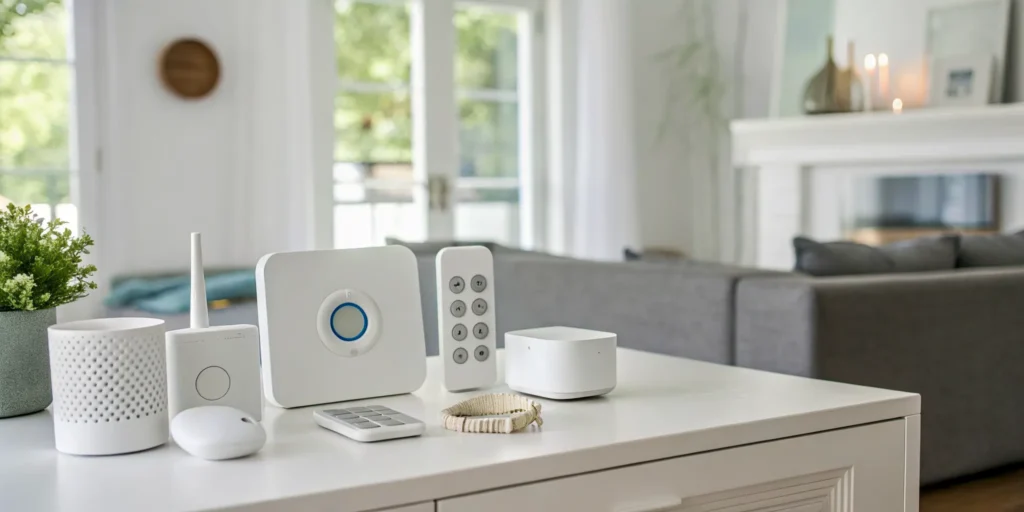
Protecting your home is about so much more than just preventing a break-in. It’s about knowing your kids are safe, being alerted to a potential fire or water leak, and having a safety net for elderly parents living independently. A truly effective security solution provides a complete sense of well-being. That’s the real power of a modern wireless smart home alarm system; it acts as the central hub for your family’s safety. In this guide, we’ll explore how these systems create a comprehensive ecosystem of protection, from smart sensors and mobile alerts to life-saving monitoring that works around the clock.
Key Takeaways
- Define your protection plan first: Before looking at any tech, decide what you need to protect, from specific entry points to life safety concerns like fire or floods. Matching the system to your home’s unique layout and your family’s lifestyle ensures you invest in features you will actually use.
- Insist on reliable backups: A security system is only useful if it works all the time, so choose one with both a battery backup for power outages and a cellular backup for internet disruptions. This dual protection guarantees your alarm can still signal for help when you need it most.
- Decide between DIY savings and professional assurance: A DIY system puts you in control and can save money, but you are responsible for installation and emergency response. Professional installation and monitoring offer complete peace of mind, knowing experts have designed, installed, and are watching over your system.
What Is a Wireless Smart Home Alarm?
When you think of a home alarm, you might picture old-school systems with wires running through the walls. A wireless smart home alarm is the modern evolution of that concept. Instead of a web of physical wires, these systems use secure, wireless signals to connect sensors, cameras, and a central control panel. This means components like door sensors and motion detectors are typically battery-powered and communicate with the main hub without any drilling or complex wiring required.
This approach offers incredible flexibility for homeowners. You can place sensors exactly where you need them and easily expand your system later if you decide to cover more areas. For anyone living in Greenville, Spartanburg, or the surrounding Upstate communities, a wireless system provides state-of-the-art protection that’s simple to install and manage, giving you peace of mind without turning your home into a construction zone.
Wireless vs. Wired: What’s the Difference?
The main difference is simple: a wireless system doesn’t need cables connecting every sensor to the main panel. While the central hub or panel usually plugs into a wall outlet for power, all the other devices, like your door contacts and motion detectors, communicate wirelessly. This makes installation much cleaner and faster. You can easily move a sensor or add a new one without needing a technician to run more wires. This flexibility is a major reason why most modern security solutions are wireless. According to security experts, today’s best wireless home security systems offer a host of benefits with very few downsides, making them the go-to choice for most families.
Are Wireless Alarms Actually Reliable?
It’s a fair question. Can a system without wires really be as dependable as a traditional one? The answer is a resounding yes. Modern wireless alarms are built with multiple layers of protection to ensure they are always working. Many systems, including those we install here in South Carolina, use a dedicated cellular connection as a backup. This means that even if your home Wi-Fi goes down or a burglar cuts your internet line, your alarm system can still send a signal to the 24/7 monitoring center. This built-in redundancy ensures your home remains protected through power outages, internet disruptions, and any other event, providing the consistent reliability you need.
Must-Have Features for Your Wireless Alarm System
Once you decide a wireless alarm is the right fit, the next step is figuring out which features are truly essential. Modern systems offer much more than just a siren; they provide a full ecosystem for safety and convenience. The best system for your South Carolina home isn’t just about the hardware you see, it’s about the powerful features working behind the scenes to give you real peace of mind. From smarter sensors to reliable backups, these are the non-negotiable features you should look for.
Choosing the Right Sensors and Coverage
Think of sensors as your system’s eyes and ears. Your top priority should be securing all ground-floor doors and windows with entry sensors. Next, motion detectors can cover large areas like living rooms or hallways. But don’t stop there. A truly comprehensive system also includes life safety detectors. For example, a water sensor near a washing machine can prevent a disastrous flood, while integrated smoke and carbon monoxide detectors are critical for protecting your family. The right combination of security sensors ensures there are no blind spots in your home’s protection.
Control From Anywhere: Mobile Apps and Remote Access
One of the biggest advantages of a modern wireless system is the ability to manage it from your smartphone. A user-friendly mobile app is a must-have. It should allow you to arm and disarm your system, check the status of your sensors, and view live camera feeds from anywhere in the world. This feature provides incredible peace of mind, letting you confirm you locked the door after leaving for work or check in on your home while you’re on vacation. Receiving instant mobile alerts for any activity means you are always connected and aware of what’s happening at home.
Connecting With Your Existing Smart Home
Your security system shouldn’t feel like a separate, isolated piece of tech. Look for a system that integrates smoothly with your existing smart home devices. Compatibility with voice assistants like Amazon Alexa and Google Assistant allows you to control your alarm with simple voice commands. You can create powerful routines, like an “away” scene that arms your system, adjusts the smart thermostat, and turns off the lights with a single command. This level of smart home integration turns your alarm from a simple utility into the central hub of a smarter, more responsive home.
A well-planned outdoor security lighting setup works alongside your smart system to keep your property well-lit and protected after dark.
Staying Protected During an Outage
What happens to your alarm if the power goes out or your internet connection drops? These are common occurrences during a South Carolina thunderstorm, and a basic system could leave you vulnerable. That’s why cellular and battery backup are crucial features. A battery backup keeps your main panel running during a power outage. Meanwhile, a cellular backup ensures your system can still send an emergency signal to the monitoring center, even if your home’s Wi-Fi is down. This dual-layered protection guarantees your home remains secure when you need it most.
Smarter Alerts and Fewer False Alarms
Constant notifications from a security system can be more annoying than helpful, especially if they are false alarms triggered by pets, passing cars, or falling leaves. Modern systems use intelligent features to reduce these unwanted alerts. Look for systems with customizable motion detection zones and the ability to differentiate between people, animals, and vehicles. Features like two-way audio through your cameras also allow you to speak with a visitor (or scare off an intruder) and verify a situation in real time, giving you more control and fewer headaches.
Keeping Your System and Data Secure
A wireless system is only effective if it’s secure from digital threats. With stories about hacked cameras and devices, it’s natural to be concerned about privacy. Reputable security systems protect your data with end-to-end encryption, the same technology used for online banking. This scrambles your video feeds and system data, making them unreadable to unauthorized users. When choosing a provider, always ask about their data security protocols. Your peace of mind depends on knowing that your physical and digital worlds are equally protected.
DIY vs. Professional Installation: Which Is Right for You?
Deciding between a DIY security system and a professional installation is one of the biggest choices you’ll make when protecting your home. Walk into any big-box store, and you’ll see shelves of all-in-one kits that promise quick, easy setup. And for some people, that’s a perfectly fine starting point. These systems are designed for convenience and can be a good fit for smaller spaces or for those who are just dipping their toes into home security.
The real question isn’t about which is “better” in general, but which is better for you. Are you comfortable being your own tech support? Do you know the optimal places to install motion sensors to avoid false alarms while covering key entry points? Professionally installed home security takes the guesswork out of the equation. It’s less about just plugging in devices and more about designing a complete security ecosystem tailored to your home’s unique layout and your family’s needs. A local expert can see vulnerabilities you might miss and ensure every component works together flawlessly from day one.
The Pros of a DIY Setup
The main appeal of a DIY setup is, without a doubt, its simplicity and accessibility. Most systems are completely wireless and designed for a tool-free, plug-and-play experience. You can often get everything up and running in an afternoon. Components like sensors are typically peel-and-stick, and the central hub guides you through the setup with voice prompts. Plus, everything is usually controlled through a slick mobile app, giving you the satisfaction of building and managing your own wireless home security system. If you enjoy a hands-on project and have a straightforward space to cover, a DIY system offers a quick and affordable way to add a layer of security.
Why Go with a Professional Install?
While DIY is about convenience, a professional installation is about confidence. When an expert technician installs your system, you’re getting more than just a helping hand. You’re getting years of experience in strategic placement. They know that a motion sensor facing a window can cause false alarms from passing cars, and they understand how to create overlapping fields of coverage with no blind spots. For more complex Smart Home Security Systems, especially those integrating fire safety and home automation, professional installation ensures every component communicates perfectly. It’s the peace of mind that comes from knowing your system was installed correctly and is ready to protect what matters most.
What DIY Actually Gets You (and What It Doesn’t)
A DIY system gives you the basic building blocks of security. You get the hardware, an app, and the responsibility to make it all work. You are the installer, the system designer, and the troubleshooter. This can be empowering, but it also means the burden of performance rests entirely on you. If a sensor is placed incorrectly or a connection fails, it’s up to you to figure it out. What a DIY system often doesn’t provide is a holistic security strategy. A professional service, on the other hand, delivers a comprehensive solution, from the initial consultation and custom design to the installation, testing, and ongoing support. It’s the difference between buying security equipment and investing in a security service.
Understanding Your Monitoring Options
Once your wireless alarm system is set up, the next big decision is about monitoring. When a sensor is triggered, who gets the alert and what happens next? This is the most important question you’ll answer. Your choice determines whether you’re the first responder or if a team of professionals has your back. Generally, you have two paths: you can monitor the system yourself, or you can hire a service for 24/7 professional monitoring. Let’s walk through what each option really means for you and your family’s safety.
No-Subscription Models: Are They Worth It?
No-subscription or “self-monitored” systems have become popular because they seem simple and cost-effective. With these, you buy the equipment, set it up, and you’re done. There are no monthly fees. When an alarm goes off, you get a notification on your phone. The biggest appeal is the savings, but it comes with a major trade-off: you are your own security dispatcher.
This means if a burglar breaks in while you’re in a meeting, on a flight, or just sleeping with your phone on silent, you might miss the alert entirely. Even if you see the notification immediately, the responsibility falls on you to verify the threat and call for help. While the upfront cost is lower, you’re taking on a significant amount of personal risk.
24/7 Professional Monitoring: What You Actually Get
This is the service most people think of when they imagine a home security system. With 24/7 professional monitoring, a dedicated team of trained experts is always watching over your home. When an alarm is triggered, an alert is sent to a secure monitoring center. A professional immediately assesses the situation, attempts to contact you to verify the emergency, and can dispatch emergency services like police or the fire department to your home in Greenville.
This service provides true peace of mind because it doesn’t depend on your availability. Whether you’re at work in Spartanburg or on vacation, you know someone is ready to respond. For threats like fire or carbon monoxide, that immediate, professional response can be life-saving. It’s a comprehensive safety net that protects your home and loved ones around the clock.
Self-Monitoring Through a Mobile App
Self-monitoring is done through a mobile app that connects to your wireless alarm system. This app is your command center, allowing you to arm or disarm your system, view live camera feeds, and receive push notifications whenever a sensor is triggered. It gives you a direct line of sight into what’s happening at home from anywhere with an internet connection.
The hands-on control is empowering. You can check on a pet, see when your kids get home from school, or confirm a package was delivered. However, the core responsibility remains the same as any no-subscription model. You are the one who has to interpret the alerts and decide what to do. While a smart home security app offers convenience, it can’t replace the reliability of a professional who is trained to manage emergencies.
How to Choose the Right System for Your Home
Start with Your Security Needs
Before you get lost in camera specs and sensor types, take a moment to walk through your home and think about what you truly need to protect. Are you in a single-family home in Greer with a big backyard, or a townhouse in downtown Greenville? Note the easy access points, like ground-floor windows or a back patio door. Your goal is to identify your home’s unique vulnerabilities.
From there, you can decide on the fundamentals. Do you want a system you install yourself, or would you prefer professional installation for guaranteed peace of mind? Think about your budget and whether you’re comfortable with a monthly monitoring contract. Answering these basic questions first will help you consider your needs and narrow down your options significantly, ensuring you don’t pay for features you won’t use.
Match Features to Your Lifestyle
The best security system is one that fits seamlessly into your daily routine. If you’re always on the go, you might want a system that lets you check in on your home through a mobile app. Many modern systems allow you to monitor your home yourself this way, often without any required monthly fees. This is perfect for checking that the kids got home from school or that a package was delivered safely.
For added convenience, look for a system that integrates with smart assistants like Amazon Alexa or Google Assistant. Being able to arm your system with a simple voice command as you’re rushing out the door can be a game-changer. Your lifestyle dictates which features are essential and which are just nice to have, so think about your daily habits and choose a system that makes life simpler, not more complicated.
Compare Installation and Monitoring Costs
Understanding the costs involved will help you find a system that fits your budget now and in the long run. Generally, you’ll face two types of expenses: the upfront cost for equipment and the recurring fee for professional monitoring. DIY systems are often more affordable at the outset, with starter kits available from brands like Arlo. These DIY systems can range from a couple hundred to over a thousand dollars depending on how many cameras and sensors you need.
Professionally monitored systems may have a lower initial equipment cost, but they typically require a long-term contract with a monthly fee. This fee, which often starts around $25 per month, covers the 24/7 team that responds to alerts. When comparing, be sure to weigh the one-time equipment purchase against the total cost of a monitoring contract over several years.
Why a Local South Carolina Expert Matters
While DIY systems offer flexibility, there’s a distinct advantage to working with a local security expert right here in South Carolina. A local team understands the specific security challenges of neighborhoods from Anderson to Spartanburg. We know the local landscape and can design a system that’s perfectly tailored to your property, ensuring there are no blind spots. Plus, when you need service or have a question, you’re calling a neighbor, not a national call center.
Even some DIY brands recognize the value of a perfect setup and offer professional installation through third-party partners. But with a dedicated local provider, that expert support doesn’t end after installation. You get ongoing service from a team that’s invested in our community’s safety, giving you a level of assurance that’s hard to put a price on.
Breaking Down the Costs of a Wireless System
Let’s talk about one of the biggest questions on everyone’s mind: how much does it all cost? The price of a wireless alarm system isn’t a single number; it’s a combination of what you pay upfront for the gear and what you might pay monthly for monitoring services. Understanding these two main components will help you set a realistic budget and find a solution that feels right for your home and your wallet.
While many national brands advertise low starting prices, the final cost often depends on the size of your home and the specific features you need. It’s also important to think about potential hidden fees that can pop up, like installation help or premium app features. We’ll walk through each of these costs so you can feel confident in your decision and avoid any surprises down the road.
Upfront Equipment Costs
The first investment you’ll make is in the hardware itself. For many popular DIY systems, you can expect to pay an initial equipment cost to get started. For example, basic packages from brands like SimpliSafe or Cove can start in the $100 to $250 range. More comprehensive wireless home security systems from companies like Arlo can range from around $200 for a starter kit to over $1,000 for a multi-camera setup.
Think of these starter packages as the foundation. They usually include a hub, a door or window sensor, and maybe a motion detector. To properly secure your home, you’ll likely need to purchase additional sensors, cameras, or a video doorbell, which will increase your upfront cost.
Ongoing Monitoring Fees
After you’ve purchased your equipment, the next cost to consider is the optional monthly fee for professional monitoring. This service is what connects your alarm system to a 24/7 dispatch center that can send police, fire, or medical help when a sensor is triggered. Most companies charge for this peace of mind. For instance, monitoring plans from well-known brands often start around $20 to $25 per month.
Some systems allow you to self-monitor through an app for free, but this means you are solely responsible for calling for help in an emergency. It’s a trade-off between monthly savings and the assurance that a professional is always watching over your home, even when you can’t.
How to Find Deals and Promotions
If you’re looking to save some money, a little bit of strategic shopping can go a long way. Many security companies run promotions around major holidays like Black Friday, Memorial Day, or the Fourth of July. Signing up for a company’s email newsletter is a great way to get notified about these sales. You can also check product listings on sites like Amazon to see which systems have high customer ratings and might be on sale.
Don’t forget to ask about local deals, too. As a South Carolina-based company, we sometimes have special offers for our neighbors in the Greenville and Anderson areas. It never hurts to call your local provider and ask if they have any bundles or promotions for new customers.
Hidden Costs to Watch Out For
It’s easy to focus on the big-ticket items, but smaller, less obvious costs can add up. For example, while many systems are designed for DIY installation, what if you’re not comfortable setting it up yourself? Some companies partner with third-party services to offer professional installation, but this will come at an extra charge.
Subscription tiers are another area to watch. A company might offer a basic monitoring plan, but features like cloud video storage or advanced smart alerts could require an upgrade to a more expensive premium plan, such as an “Arlo Secure Premium” subscription. Finally, check with your local municipality about any potential permit fees for alarm systems or fines for excessive false alarms.
Integrating Your Alarm with Your Smart Home
A great security system doesn’t just protect your home; it makes it smarter and more responsive to your life. Integrating your wireless alarm with your existing smart home devices creates a single, powerful ecosystem. Instead of juggling multiple apps, you can manage your security, lights, locks, and thermostats all in one place. This creates a seamless experience that adds both convenience and an extra layer of security. It’s about making your home work for you, giving you peace of mind that is simple and intuitive.
Connecting with Alexa and Google Home
If you already use a smart speaker, you’ll love this feature. Most modern wireless alarms are designed to work with popular smart assistants like Amazon Alexa and Google Assistant. This means you can control your security system with simple voice commands. As you’re heading out, you can say, “Alexa, arm my system,” without fumbling for your phone or keypad. At night, you can ask, “Hey Google, are the doors locked?” from the comfort of your bed. It’s a small change that makes a huge difference in your daily routine, making security feel less like a chore and more like a natural part of your home.
What About Apple HomeKit?
For those of us living in the Apple world, this is a question I get all the time. While most systems play nicely with Alexa and Google, Apple HomeKit compatibility can be less common. Some security brands offer full integration, but others don’t. This is why it’s so important to check the specifics before you commit to a system. If you want to be able to ask Siri to arm your alarm or see your camera feeds in the Home app, make sure the system you choose explicitly lists HomeKit support. A quick check upfront can save you a lot of headaches later and ensure your smart home works together perfectly.
Planning for Future Add-Ons
Your security needs today might not be your security needs in five years. Maybe you’ll want to add a video doorbell, outdoor cameras for the backyard, or even a smart lock for the front door. A truly smart system is one that can grow with you. Look for a wireless alarm that is easily expandable, allowing you to add new sensors and devices without a complete overhaul. This flexibility is key to creating a long-term smart home ecosystem that adapts to your life, whether you’re welcoming a new baby or just want to keep an eye on your pets while you’re away. Planning for these future additions from the start ensures your investment is protected for years to come.
4 Myths About Wireless Alarms, Busted
Wireless technology has improved dramatically, but some outdated ideas about security systems still persist. If you’ve been hesitant to go wireless because of something you’ve heard, it’s time to set the record straight. Let’s look at the facts behind the most common myths so you can feel confident about protecting your home or business. Understanding how these flexible and intelligent systems really work is the first step toward better security.
Myth #1: Wireless systems are unreliable
It’s understandable to worry about a dropped signal, but modern wireless security systems are built for consistency. Unlike a typical Wi-Fi connection, these systems use dedicated, secure frequencies to communicate. Many of the best systems also include cellular backup as a standard feature. This gives your alarm a second, independent line of communication to the monitoring center. So, if your internet ever goes down, your system doesn’t miss a beat. This multi-layered approach makes today’s wireless alarms just as dependable as their wired counterparts.
Myth #2: You need a perfect Wi-Fi connection
While many wireless systems use your home’s Wi-Fi, they aren’t completely dependent on it. This is where cellular backup becomes so important. Think of it as a safety net. If a storm knocks out your power and internet, the cellular chip inside your control panel takes over instantly, keeping you connected to your 24/7 monitoring team. This ensures that even during an outage, your system can still send an emergency signal. It’s a crucial feature that provides true peace of mind, guaranteeing your home in Greenville or your business in Spartanburg remains protected.
Myth #3: Installation is a huge, complicated project
When you picture alarm installation, you might imagine technicians drilling holes and running wires through your walls. With wireless systems, that picture is completely outdated. Because the components communicate wirelessly, there’s no need for disruptive wiring, which makes the setup process incredibly clean and fast. Sensors can be placed on doors, windows, and walls in minutes. This also gives you flexibility; if you rearrange a room or want to move a sensor, you can do it easily. Whether you choose a professional installation or a DIY kit, you’ll be up and running much faster than you think.
Myth #4: Wireless alarms are too expensive
It’s easy to assume that smarter technology comes with a premium price tag, but that’s not always the case with wireless alarms. In fact, they can be more affordable than traditional wired systems because you save a significant amount on labor costs. The competition in the market has also led to a wide range of affordable systems packed with smart features. When you factor in the savings on installation and the variety of monitoring plans available, securing your home with advanced technology is more accessible than ever.
Making Your Final Decision: Which System Is Right for You?
You’ve learned about sensors, monitoring, and installation. Now comes the big question: which system is the perfect fit for your home? The best choice always comes down to your specific situation. Think of it less like a test with one right answer and more like finding the right partner for your home’s security. It’s about matching the technology to your life, not the other way around. By focusing on what truly matters to you and your family, you can choose a system that provides real peace of mind, whether you’re in downtown Greenville or enjoying a quiet evening in Taylors.
Start by Assessing Your Unique Needs
Before you look at any equipment, think about what you’re trying to protect. Are you securing a small apartment, a multi-story family home, or a vacation property on the lake? The size and layout of your space will determine how many sensors you need. Also, consider what you want to be alerted about. Is your main concern a break-in, or are you also worried about fire, carbon monoxide, or water leaks? For many South Carolina families, especially those with seniors aging in place, features like medical alert pendants are just as important as door sensors. Make a simple list of your “must-have” protections first.
Match the System to Your Lifestyle
Your daily routine should guide your choice. Are you a hands-on, DIY type who enjoys setting up new tech, or would you rather have a professional handle the installation perfectly from day one? There’s no wrong answer. Similarly, think about how you want to interact with the system. The biggest lifestyle choice is monitoring. You can find great systems that let you self-monitor through an app with no monthly fees. For others, the assurance of 24/7 professional monitoring is non-negotiable. It’s all about what helps you sleep better at night.
Plan for Your Budget and Future Growth
Finally, let’s talk about money and long-term planning. It’s wise to set a budget for both the upfront equipment and any potential monthly fees. While some systems work without a subscription, a monthly plan often adds critical features like professional monitoring or cloud video storage. Also, think about the future. You might only need a few sensors now, but what about in a year or two? Choosing a system that is easy to expand with new cameras or sensors gives you the flexibility to adapt your security as your life changes. Your security system should be able to grow with you.
Related Articles
- Your Guide to a Burglar Alarm for a House in Greer
- Smart Home Alarm Installation Greenville SC: What to Know
- DIY vs Professional Home Security: Which is Best?
Frequently Asked Questions
What happens if my power or internet goes out? Will my alarm stop working? This is a great question and a top concern for many homeowners. A quality wireless system is designed with these exact situations in mind. Your system’s main control panel should have a battery backup to keep it running during a power outage. More importantly, professionally monitored systems include a cellular backup, which creates an independent, dedicated connection to the monitoring center. This means even if a storm knocks out your power and internet, your system can still send an emergency signal for help.
Can I add more devices like cameras or sensors to my system later on? Absolutely. One of the best things about modern wireless systems is their flexibility. You can easily expand your security ecosystem as your needs change over time. Whether you decide you want to add a video doorbell, outdoor cameras for the backyard, or extra water sensors in the basement, a good system allows you to add new devices seamlessly. This ensures your initial investment continues to serve you well for years to come.
I have a dog. Will he constantly set off the motion detectors and cause false alarms? This is a very common and practical concern. Thankfully, modern motion detectors are much smarter than they used to be. Many systems use passive infrared sensors that can be calibrated to ignore pets up to a certain weight, usually around 40 to 80 pounds. When you work with a professional installer, they can strategically place and adjust the sensors to maximize coverage while minimizing the chances of your furry friend triggering a false alarm.
Do I have to sign a long-term contract for a professionally monitored system? It depends on the provider and the plan you choose. While some companies do require a multi-year agreement, especially if they offer discounted equipment upfront, it’s not a universal rule. Many providers, including local ones, offer more flexible month-to-month options. It’s always best to ask about contract terms directly. The goal is to find a monitoring plan that gives you the protection you need without locking you into a commitment that doesn’t feel right for you.
Is a wireless system really as secure as a wired one? Yes, today’s wireless systems are built to be just as secure and reliable as their wired counterparts. They communicate on secure, encrypted frequencies to prevent tampering. Plus, the combination of battery and cellular backups ensures the system stays online even if power or internet lines are cut. When you choose a reputable provider, you are getting a system that has been rigorously tested to provide consistent, dependable protection for your home and family.