Integrated Home Security: Your All-in-One Guide
April 27, 2026
What Is Monitored Home Security? A Complete Guide
April 28, 2026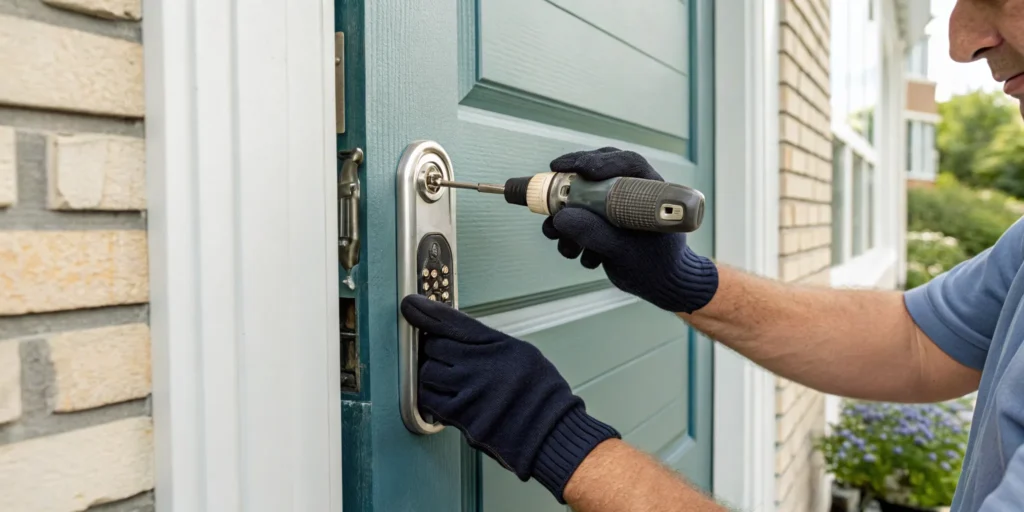
We’ve all been there. That sinking feeling on the way to a trip: did I lock the front door? Or the scramble to let a pet sitter in while you’re stuck at the office. A smart lock is designed to solve these exact headaches, adding major convenience and peace of mind to your daily life. But that convenience is only as reliable as its setup. A professional smart lock installation in Greenville, SC, guarantees your device is perfectly aligned and connected, so you can count on it to work every single time.
Key Takeaways
- Partner with a Local Pro for a Flawless Setup: A professional installer ensures your lock is physically secure and digitally configured correctly, handling everything from door alignment to app setup for total peace of mind.
- Prioritize Core Features for Real-World Use: Look for a smart lock that offers remote control from your phone, customizable access codes for family and guests, and robust encryption to keep your connection secure.
- Complete a Simple Pre-Installation Checklist: Ensure a smooth installation by checking your door’s alignment, confirming a strong Wi-Fi signal at your door, and deciding on a backup entry method beforehand.
How to Find a Smart Lock Installer in Greenville
Upgrading to a smart lock is an exciting step toward a more secure and convenient home, but the installation can feel a little intimidating. While it might be tempting to tackle it yourself, a professional installation ensures everything works correctly from day one. Finding the right person for the job in Greenville means looking for a local expert who understands both the technology and our community’s needs, giving you total confidence in your new setup.
Why Hire a Local Pro for Your Smart Lock?
When it comes to your home’s security, there’s a real advantage to working with a local professional. A Greenville-based expert understands the specific security challenges our neighborhoods face and can recommend solutions that make sense for your home or business. They’re not just a voice on a national hotline; they’re your neighbors. This local presence means you get personalized service and faster response times if you ever need support. Companies that specialize in local business security know how to tailor systems for commercial properties, while residential experts can focus on what keeps your family safe. Choosing a local installer means building a relationship with a team invested in protecting our community.
What to Look For in a Smart Lock Installer
A quality installation is more than just attaching a lock to your door. A true professional will offer a complete service to ensure your smart lock works perfectly. This should always include inspecting your door and frame for compatibility, installing the hardware correctly, and connecting the device to your Wi-Fi network. They should also help you set up the app on your phone and walk you through creating your first access codes. Look for a provider that sees the bigger picture. A company that also offers comprehensive security solutions, like alarm systems and surveillance cameras, can help you build an integrated system where all your devices work together seamlessly for total peace of mind.
Understanding the Different Types of Smart Locks
Once you decide to get a smart lock, you’ll quickly discover there isn’t just one type. The market is full of options, each with its own way of connecting and operating. Choosing the right one comes down to your daily routines, your security goals, and how connected you want your home to be. Think about what matters most to you—is it remote access from anywhere, or just the simple convenience of not needing a key when you get home? Let’s walk through the main types so you can find the perfect fit for your lifestyle.
Bluetooth-Enabled Locks
Think of Bluetooth locks as a digital key that lives on your smartphone. When your phone is within a certain range—usually about 30 feet—you can use an app to lock or unlock your door with a simple tap. This is a fantastic entry point into smart lock technology because it directly solves the problem of fumbling for keys. They are generally straightforward to install and use, making them a popular choice for homeowners who want a simple upgrade. The main thing to remember is that their functionality is based on proximity; you can’t check on your lock from the office. According to Consumer Reports, while they are user-friendly, they do have limitations in range compared to other types.
Wi-Fi Connected Locks
If you want the ability to control your lock from anywhere, a Wi-Fi connected model is what you’re looking for. These locks connect directly to your home’s Wi-Fi network, giving you access through a smartphone app no matter where you are. You can lock the door from your desk in downtown Greenville, let a dog walker in while you’re on vacation, or get an alert when your kids get home from school. This level of control offers incredible peace of mind. As noted by experts at TechHive, these models can be more expensive and may use more battery power, but they also provide greater flexibility and real-time monitoring that many homeowners find invaluable.
Biometric (Fingerprint) Locks
For the ultimate in key-free convenience, biometric locks use your fingerprint as the key. There’s no code to remember or phone to find—you just place your finger on the scanner, and the door unlocks. This technology offers an incredibly high level of security and is perfect for families, as you can register fingerprints for everyone who needs access. It’s an ideal solution for anyone who wants immediate entry without any fuss. As CNET points out, these locks are celebrated for their ease of use and quick access. While they can be on the higher end of the price spectrum, the seamless experience is often worth it for the right household.
Z-Wave and Zigbee Locks for Smart Home Hubs
If you’re building a fully integrated smart home, then a lock that uses Z-Wave or Zigbee technology is the way to go. These locks don’t connect directly to your Wi-Fi but instead communicate with a central smart home hub. This is where the magic of home automation really happens. Your lock becomes part of a larger ecosystem, allowing you to create custom scenes. For example, you could have your door unlocking automatically trigger the entryway lights to turn on and your security system to disarm. This is exactly the kind of comprehensive smart home system our team at ADP Security Systems loves to design, ensuring all your devices work together seamlessly for maximum convenience and protection.
Must-Have Smart Lock Features
When you start looking at smart locks, the number of options can feel a bit overwhelming. They all promise convenience, but not all are built the same. To help you find the right fit for your Greenville home, let’s focus on the core features that deliver real security and simplify your daily routine. A quality smart lock should do more than just replace your key; it should integrate smoothly into your life and give you complete control over who comes and goes.
Unlock Your Door From Anywhere
One of the biggest perks of a smart lock is the ability to control your door from anywhere. Smart locks let you lock and unlock your door using a simple smartphone app, which means you no longer need a traditional metal key. Whether you’re at work and need to let a family member in, or you’re on vacation and want to double-check that everything is secure, remote access gives you peace of mind. You can grant entry with a quick tap on your phone, eliminating the need to rush home or leave a key under the mat.
Create Unique Codes for Family and Guests
A smart lock allows you to manage access to your home with incredible precision. You can give each family member their own unique code, so you always know who is coming and going. Even better, you can create temporary codes for guests, house sitters, or service workers that expire after a set time. This means you never have to hand out a physical key that could be lost or copied. Once a visit is over or a project is complete, you can simply delete the code from your app, ensuring your home remains secure.
Sync With Your Smart Home and Voice Assistants
The best smart locks don’t just work alone; they connect with your broader smart home ecosystem. Look for models that integrate with voice assistants like Amazon Alexa, Google Assistant, or Apple Home. This allows you to lock your door with a simple voice command as you’re heading to bed. You can also create automated routines, such as having your doors lock automatically when your smart thermostat switches to “away” mode. This seamless connection between devices makes your entire home security system more intuitive and responsive to your lifestyle.
Prioritizing Security and Encryption
While smart locks solve traditional problems like lock picking, it’s important to address their digital security. A reliable smart lock must protect your data with strong, end-to-end encryption. This prevents unauthorized users from intercepting the signal between your phone and your lock. Think of it as the same level of security you’d expect from online banking. Choosing a lock with proven encryption technology ensures that your keyless convenience doesn’t come at the expense of your safety, giving you a solution that is both smart and secure.
Durability and Weather Resistance
A smart lock is exposed to the elements 24/7, so it needs to be tough enough to handle whatever the South Carolina weather throws at it. From our humid summers to unexpected freezes, your lock must perform reliably. When choosing a model, look for its Ingress Protection (IP) rating. An IP rating of at least IP65 ensures the lock is sealed against dust and can withstand water splashes from a rainstorm. Also, check the manufacturer’s specified operating temperature range to confirm it can handle both the summer heat and winter cold. A durable, weather-resistant lock isn’t just a nice-to-have feature; it’s essential for ensuring your home stays secure year-round.
Built-in Tamper Alarms
While a smart lock protects against digital threats, it also needs to stand up to physical ones. This is where a built-in tamper alarm becomes a critical feature. If someone tries to break, remove, or otherwise mess with the lock itself, the alarm will sound and send an immediate alert to your smartphone. This feature adds an essential layer of defense, ensuring that any unauthorized attempt to bypass your lock is flagged instantly. When integrated with a monitored security system, like the ones we design at ADP Security, this alert can trigger a professional response, giving you an even greater sense of security whether you’re home or away.
Advanced Features: Geofencing and Schedules
Beyond basic locking and unlocking, the best smart locks offer features that truly automate your home’s security. Geofencing is a perfect example—it uses your phone’s location to automatically unlock the door as you approach, which is a lifesaver when your hands are full of groceries. Scheduling is another powerful tool that lets you set specific times for the door to lock automatically, like every night at 10 PM, so you never have to wonder if you forgot. These advanced features work in the background to make your life easier and your home more secure without you having to think about it.
The Importance of a Good Mobile App
Your smart lock is only as good as the app that controls it. This app is your command center for creating access codes, checking the lock’s status, and viewing activity logs, so it needs to be reliable and easy to use. Before you commit to a lock, take a few minutes to read reviews for its companion app in the Apple App Store or Google Play Store. Is it user-friendly? Does it crash often? A poorly designed app can turn a convenient piece of hardware into a daily frustration. A good mobile app is crucial for managing your smart lock effectively and getting the most out of its features from anywhere.
How Much Does Smart Lock Installation Cost in Greenville?
Budgeting for a home upgrade is always a smart move, and adding a smart lock is no different. The good news is that professional installation in Greenville is straightforward and affordable. Understanding the costs upfront helps you plan accordingly and ensures there are no surprises. The final price depends on a few key variables, including the state of your current door and the specific lock you’ve chosen. Let’s break down what you can expect to invest in this key piece of home security.
Average Cost for Professional Installation
For a standard professional installation in the Greenville area, you can expect the labor cost to be between $100 and $400. This range typically covers the service of a qualified technician removing your old lock, fitting the new smart lock, and ensuring it functions correctly with your door. This fee is for the installation service itself and doesn’t include the price of the smart lock. Investing in a professional ensures the job is done right the first time, giving you confidence that your home is secure and your new technology is working exactly as it should.
What Factors Affect Your Installation Cost?
While the $100 to $400 range is a great starting point, a few things can affect your final bill. If your door needs adjustments to accommodate the new lock, that can add to the cost. For example, drilling new holes or fixing an alignment issue might add an extra $50 to $150. The complexity of the smart lock you choose also plays a role; a simple keypad lock will likely cost less to install than a model with more advanced biometric features. Your location within the Upstate can also cause slight variations in labor rates.
DIY vs. Pro Installation: Which Is Right for You?
If you’re comfortable with tools, you might be tempted to install the lock yourself to save on labor. Many smart locks come with clear instructions, and a DIY approach can be a good option if you have the time and confidence. However, there’s real value in hiring a professional. A local security expert guarantees a flawless installation, preventing subtle mistakes that could compromise your home’s security. They handle any door adjustments on the spot and ensure your lock is perfectly calibrated. For many homeowners, the peace of mind that comes from a guaranteed, secure fit is well worth the smart lock installation cost.
When Professional Installation is Required
While many smart locks are designed for DIY, certain situations call for a professional to ensure your security isn’t compromised. If you’re integrating the lock into a complete smart home security system, an expert is essential. They can ensure your new lock communicates seamlessly with your alarms, cameras, and monitoring service, creating a truly connected and protected home. Additionally, if your door is older, warped, or the frame is misaligned, a professional has the tools and expertise to make the necessary adjustments for a secure fit. Ultimately, a professional installation guarantees that your lock is both physically secure and digitally configured correctly from the start, giving you total confidence that your investment is working exactly as it should.
Smart Locks vs. Traditional Locks: Is It Time to Upgrade?
Deciding between a familiar deadbolt and a new smart lock can feel like a big step. For years, the classic lock and key have been the standard for securing our homes here in South Carolina. But it’s worth asking if your front door could be smarter and safer. A smart lock isn’t just a gadget; it’s a new layer of convenience and control for your home security. It changes how you manage access for family, friends, and service providers, giving you peace of mind whether you’re at home in Greer or away. Let’s break down what a smart lock offers.
The Perks of a Keyless Life
The most immediate benefit of a smart lock is freedom from physical keys. No more fumbling for keys with full hands, hiding a spare under the mat, or calling a locksmith for a lost key. You can unlock your door with a simple code, a tap on your smartphone, or your fingerprint. This keyless convenience is a modern solution to home security that offers great flexibility. You can create unique, temporary access codes for guests or contractors and delete them when no longer needed, and even check if your door is locked from your office.
Are Smart Locks Really Safe?
It’s natural to wonder if a connected device is as safe as a traditional lock. While smart locks introduce digital considerations, it’s a myth that they are less secure. They eliminate many vulnerabilities of standard locks, like lock picking or unauthorized key copies. There are many common misconceptions about smart door locks, but a professionally installed system uses advanced encryption to protect against digital threats. Working with a local expert ensures your lock is configured correctly, keeping your connection and home secure.
Understanding Hacking Risks and Password Hygiene
Let’s talk about the digital side of things. While a smart lock protects you from physical threats, it’s just as important to secure it from online risks. The best defense starts with good password hygiene. Your lock’s password should be unique, at least 12 characters long, and include a mix of letters, numbers, and symbols. It’s also crucial to keep your lock’s internal software, or firmware, updated. Manufacturers release these updates to patch security gaps. For an even stronger defense, enable two-factor authentication (2FA) if it’s available. This requires a second verification step, like a code sent to your phone, making it much harder for anyone to gain unauthorized access. Regularly checking your lock’s activity log for any unusual entries is another smart habit. When we help a homeowner in Greenville set up their system, we make sure these digital safeguards are in place from day one.
What Happens When the Battery Dies?
“What happens if the power goes out or my phone dies?” This is a common question. Smart lock manufacturers have this covered. Most models are battery-powered and will warn you with phone notifications and audible chirps long before the battery runs out. Even if you miss the warnings, many locks include backup power options, like a terminal for a 9V battery to power the keypad. Some models even retain a traditional keyway as a final backup, so you’re never locked out.
Considering the Cost Difference
It’s true that a quality smart lock costs more upfront than a traditional deadbolt you might find at a hardware store. But it’s helpful to see it as an investment in your home’s security and your own peace of mind, not just a one-time purchase. Think about the recurring costs of a standard lock—like calling a locksmith to re-key your home in Simpsonville every time a key is lost or you part ways with a contractor. Those expenses add up. With a smart lock, you can grant or revoke access instantly from your phone, for free. Many homeowners find the initial price is easily justified by the daily convenience and enhanced control, especially when you consider how smart home technologies can also add to your property’s resale value.
What to Do Before Your Installer Arrives
Getting a new smart lock is exciting! Before your installation day, a little prep work can make the process completely seamless. Think of it like prepping your kitchen before you start cooking. Taking a few minutes to run through this simple checklist will ensure your new lock works perfectly from the moment it’s installed, giving you that peace of mind you’re looking for.
Is Your Door Ready for a Smart Lock?
First, let’s look at your door. A smart lock needs a well-aligned door to function correctly. If your current deadbolt sticks or you have to pull the door to get it to lock, a smart lock will likely have the same problem. Check that the bolt extends smoothly into the door frame without friction. An improper fit can cause the motor to strain and drain the battery quickly. Our technicians always assess this during installation, but giving your door a quick check helps you know if any minor adjustments are needed for a perfect smart lock installation.
Checking for an Existing Deadbolt
Most smart locks are designed to replace your existing deadbolt, not your doorknob or handle. Take a look at your door—you should see a separate deadbolt lock above the handle. This is the part that will be swapped out. The installation process involves carefully taking out the old hardware and fitting the new smart lock components, including the latch, strike plate, and the interior and exterior assemblies. While our technicians handle this every day, knowing what to expect helps you understand the process. If you don’t have a separate deadbolt, your door might require more significant modifications, which is something to discuss before installation day.
How to Measure Your Door’s Backset
Here’s a term you might not hear often: backset. It’s simply the distance from the edge of your door to the center of the hole for the deadbolt. This measurement is crucial for ensuring your new smart lock fits perfectly. Most doors have a backset of either 2 ⅜ inches or 2 ¾ inches. The good news is that many smart locks are adjustable to fit both sizes. However, it’s a great idea to check the backset measurement with a tape measure beforehand. This quick check helps confirm compatibility and prevents any surprises during the installation, ensuring a smooth and efficient setup.
Incompatible Door Locks to Watch For
While smart locks work with most modern doors, there are a few exceptions to keep in mind. They are generally not compatible with mortise locks, which are older, more complex locks set into a pocket on the edge of the door. Another common incompatibility is with door handles that are combined with the deadbolt into a single, connected unit. Because smart locks are designed to replace only the deadbolt portion, these all-in-one handlesets won’t work. Also, check your door’s thickness; most smart locks are designed for doors no thicker than two inches. Identifying any of these situations ahead of time allows us to find the right solution for your home.
Test Your Wi-Fi and Smartphone Connection
Your smart lock needs a reliable connection to do its job. Most models connect to your phone via Wi-Fi or Bluetooth. Before installation, stand by your front door and check the Wi-Fi signal on your phone. If you only have one or two bars, you might experience lag or connection drops when you try to lock or unlock the door remotely. A weak signal can cause frustrating issues. Also, make sure your smartphone’s operating system is up to date, as the lock’s app will need it to run smoothly. A strong home network is the backbone of any smart home.
Always Have a Backup Plan
Technology is amazing, but it’s always smart to have a plan B. What happens if your phone battery dies or the power goes out? Many people worry about getting locked out, but it’s an easy problem to solve with a little foresight. We always recommend having a backup plan. This could be keeping a spare physical key (if your model has one) with a trusted neighbor or in a secure lockbox. Alternatively, choose a smart lock that includes a built-in keypad, allowing you to enter a code if your phone isn’t available. This ensures you can always get inside, no matter what.
DIY Smart Lock Installation: A Step-by-Step Guide
If you’re ready to roll up your sleeves and tackle the installation yourself, you’re in the right place. Many smart locks are designed with DIY in mind, making it a manageable weekend project for anyone comfortable with a screwdriver. Following the instructions carefully is the key to success, as a proper installation ensures your lock is both physically secure and digitally reliable. This guide will walk you through the general steps, but always remember to consult the specific manual that came with your device.
Tools and Materials Needed
You might be surprised to learn that you probably already have everything you need. Most smart lock kits are designed for a straightforward installation that doesn’t require a professional toolset. In nearly all cases, the only tool you’ll need is a standard Phillips-head screwdriver. The kit should include the lock components, a new latch and strike plate, and all the necessary screws and bolts. Be sure to have the required batteries on hand (usually AA) and your smartphone fully charged for the final setup phase. With the right preparation, you can have your new lock installed in about 30 minutes.
The Installation Process in 7 Steps
Installing a smart lock is a process of replacing your old deadbolt with the new hardware. It’s a sequence of simple steps, but the order is important. We’ll break it down for you here. Just take your time, follow along, and you’ll be done before you know it.
Step 1: Remove Your Old Deadbolt
Begin by completely removing your existing deadbolt. Start on the interior side of your door and unscrew the thumbturn mechanism. Next, locate and remove the two mounting screws that hold the interior and exterior portions of the lock together. Once they’re out, you should be able to easily pull off both the interior assembly and the exterior keypad or keyhole, leaving an open hole in your door.
Step 2: Install the New Latch and Strike Plate
With the old lock gone, it’s time to install the new deadbolt latch. Slide the new latch into the hole on the edge of the door, making sure any labels like “top” are facing the correct direction. Secure it with the provided screws. You’ll also want to replace the old strike plate on the door frame with the new one included in your kit to ensure a perfect fit.
Step 3: Position the Exterior Keypad
Now for the exterior part of your lock. Take the keypad and carefully feed its attached data cable through the door hole, passing it underneath the latch you just installed. Slide the tailpiece through the latch mechanism and press the keypad flush against the outside of your door. Make sure it’s straight and properly seated before moving on.
Step 4: Attach the Interior Mounting Plate
Head back to the inside of the door. Take the interior mounting plate and guide the data cable from the keypad through the designated opening. Place the plate against the door, and then use the provided bolts to secure it to the exterior keypad. Tighten the bolts evenly until the entire unit feels snug and stable, but be careful not to overtighten.
Step 5: Connect the Interior Assembly
This step brings the “smart” part of your lock to life. Carefully connect the data cable to the port on the interior assembly. Once it’s securely plugged in, tuck any excess wire away and snap the interior assembly onto the mounting plate. Use the final small screws to fasten it into place.
Step 6: Insert Batteries and Test the Lock
Before you do anything else, it’s time for a power-up. Open the battery compartment on the interior assembly and insert the required batteries. The lock will likely make a sound or show a light to indicate it’s on. Now, test the lock’s basic function by using the thumbturn to extend and retract the deadbolt. Keep the door open for this test!
Step 7: Calibrate and Configure via the App
The final step is to sync the lock with your phone. Download the manufacturer’s companion app and follow the on-screen instructions to pair your device. The app will guide you through the process to calibrate the lock, which teaches it the locked and unlocked positions of your door. From here, you can set up your master PIN, create access codes for family, and customize your settings.
Common Installation Pitfalls and How to Avoid Them
Even the most straightforward DIY project can have a few tricky spots. When it comes to smart locks, a small mistake during installation can lead to big frustrations, like a quickly draining battery or a deadbolt that just won’t turn. But don’t worry—most of these issues are easy to avoid if you know what to look for. Think of this as your cheat sheet for a smooth, successful installation. By paying attention to these common pitfalls, you can ensure your new lock works perfectly from the very first try.
Pro Tip: Keep the Door Open During Setup
This might be the single most important tip for any smart lock installation: do not close your door until you have fully installed and tested the lock. It’s a simple rule that can save you from a major headache. If something isn’t connected correctly or the lock hasn’t been calibrated, you could accidentally lock yourself out of your house. By keeping the door open throughout the entire process—from inserting the batteries to configuring the app—you can safely test the keypad, thumbturn, and app controls without any risk.
Troubleshooting a Grinding or Jamming Lock
If you hear a grinding noise or the motor seems to struggle when you try to lock or unlock the door, stop and investigate. This is a classic sign of misalignment. The deadbolt is likely rubbing against the strike plate on the door frame instead of sliding smoothly into the hole. This friction not only makes the lock difficult to operate but also puts a huge strain on the motor, which will drain your batteries in no time. You’ll need to adjust the strike plate’s position until the bolt can extend and retract without any resistance.
Getting the Calibration Right
Calibration is a critical final step that many people rush through. This is the process where you teach your smart lock the precise locked and unlocked positions of the deadbolt. It’s almost always done through the lock’s mobile app. If the calibration is off, the lock might not fully extend, leaving your door insecure, or it might not retract enough, making the door difficult to open. Follow the app’s instructions carefully. Some apps also allow you to set up access codes and other features online, giving you another way to manage your lock’s settings.
Ensuring Correct Component Alignment
A smooth-operating smart lock is all about proper alignment, and that starts during the physical installation. One detail that’s easy to miss is the position of the deadbolt itself during setup. For many models, the instructions will specify that you need to install certain components while the deadbolt is in the extended (locked) position. Following this ensures the tailpiece and internal mechanisms are correctly oriented from the start. Double-checking these small details will prevent you from having to take the lock apart and start over.
How to Choose the Right Installation Pro
Finding the right person to install your new smart lock is just as important as picking the lock itself. A professional installation ensures everything works smoothly from day one, giving you true peace of mind. When you partner with a local expert in the Greenville area, you’re not just getting a service; you’re gaining a resource you can trust for the long haul. Here’s how to vet your options and find the best installer for the job.
Questions to Ask Your Smart Lock Installer
Before you hire someone, it’s smart to have a few key questions ready. Start by asking about their specific experience with smart locks. A general handyman might not understand the details of getting a perfect fit, which can lead to issues like misaligned bolts or an improper fit with the door frame. A seasoned pro knows how to prevent these problems.
Next, ask how they handle the software and security setup. You want an installer who can confidently connect the lock to your Wi-Fi, help you set up the app on your phone, and explain the security features. This is your chance to bring up any concerns and ensure they’re setting up your system to be as secure as possible.
What About Warranties and Ongoing Support?
A great installation is about more than just the day of service. Ask potential installers what kind of warranty they offer on their workmanship. The smart lock’s manufacturer warranty likely won’t cover issues caused by a faulty installation, so a company that stands by its work is essential.
You should also find out what ongoing support looks like. If you have trouble with the app a month from now, who do you call? Look for a provider that offers expert installation and reliable support long after the job is done. Companies that specialize in comprehensive security, from alarms to surveillance cameras, often provide better long-term service because they’re invested in your total home safety.
What to Expect on Installation Day
Knowing what to expect can make installation day go smoothly. A professional installer should start by inspecting your door and frame to confirm compatibility. They will then remove your old lock and install the new one, making sure it’s perfectly aligned and secure.
After the physical installation, they’ll guide you through the digital setup. This includes connecting the lock to your home’s Wi-Fi network, downloading the companion app to your smartphone, and showing you how to create access codes and use all the key features. Don’t be shy about asking questions; a good installer will make sure you feel completely comfortable using your new smart lock before they leave.
Related Articles
- Smart Home Alarm Installation Greenville SC: What to Know
- Your Guide to Commercial Burglar Alarms in Greenville SC
- Commercial Fire Alarm Installation Greenville SC: A Guide
- Pro Security Camera Installation Greenville SC: A Guide
Frequently Asked Questions
Is a smart lock really safer than my traditional deadbolt? That’s a great question, and the answer is yes, in several key ways. Smart locks are designed to eliminate the risks that come with physical keys, like someone making an unauthorized copy or picking the lock. They also give you a detailed activity log, so you always know who has accessed your home and when. When installed by a professional, a high-quality smart lock uses strong encryption to protect its digital signal, making it a very secure upgrade for your home.
What happens if my Wi-Fi or power goes out? Am I locked out? Not at all. This is a common concern, but smart locks are designed with multiple backup plans. Most run on batteries that last for months and give you plenty of low-battery warnings. If the Wi-Fi goes down, you can still use the keypad or your phone’s Bluetooth connection to get inside. Even in a power outage, the lock’s internal batteries keep it running, so you’ll never be left stranded.
Can you install a smart lock I’ve already purchased? Absolutely. While we can certainly recommend models that we trust and know work well for homes in our area, we are happy to install a smart lock that you have already bought. Our main goal is to ensure the device is installed correctly and securely, regardless of where you purchased it, so you can have complete confidence in your home’s security.
My door is a little old and sometimes sticks. Can a smart lock still be installed? This is exactly why a professional installation is so important. A smart lock’s motorized deadbolt needs to move without any friction. If your door sticks or is misaligned, it can strain the motor and drain the battery. During our visit, we will assess your door and frame and can often make the minor adjustments needed to ensure a perfect, smooth fit for your new lock.
How long does the installation process typically take? A standard smart lock installation is usually completed in about an hour. This gives our technician enough time to carefully remove your old hardware, install the new lock, connect it to your network, and walk you through how to use the app. If your door requires any adjustments, it might take a little longer, but we always make sure the job is done right and that you feel comfortable using your new lock before we leave.