5 Best Local Home Security Companies in Greenville
April 24, 2026
Fire Alarm Testing Services: A Complete Guide
April 24, 2026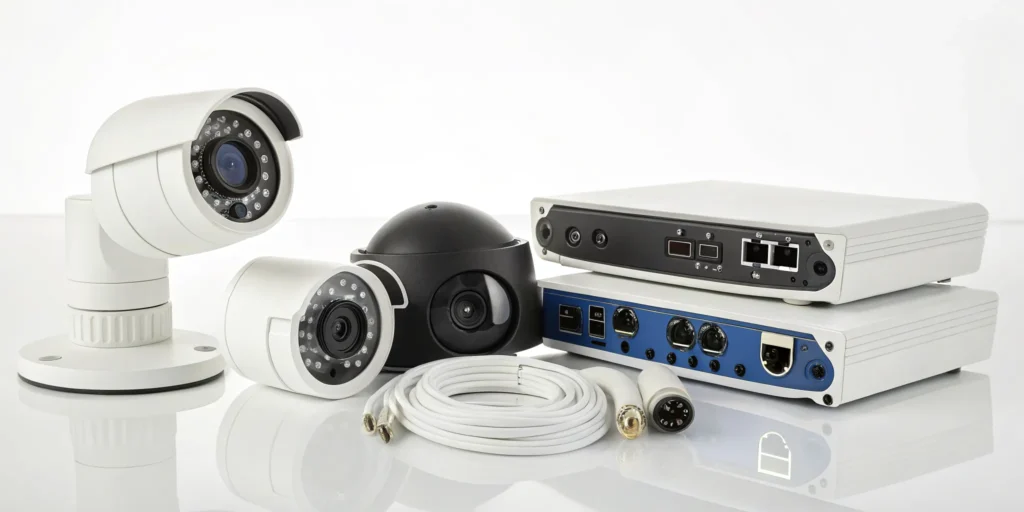
Your security cameras should do more than just record footage. If you’re only reviewing incidents after they happen, you’re missing out on their biggest benefits. A modern surveillance system for your business is a powerful intelligence tool. It helps you understand customer traffic patterns, ensure safety protocols are followed, and provides clear evidence to protect you from false liability claims. It’s a way to improve training, streamline operations, and safeguard your bottom line. The right system transforms from a simple security measure into an active asset that helps you run a smarter, safer, and more efficient business.
Key Takeaways
- Start with a professional security assessment: Before buying any equipment, have an expert identify your property’s specific vulnerabilities. This step ensures you invest in a system with the right features, like HD video and smart alerts, that solves your unique business challenges.
- Invest in professional installation and maintenance: Avoid the critical security gaps that come with a DIY setup by having certified technicians manage camera placement and configuration. A regular maintenance plan is just as crucial, guaranteeing your system is reliable and ready to perform when an incident occurs.
- Choose a local partner you can trust: Protect your business by working with a licensed and insured provider who understands South Carolina’s surveillance laws. Always check online reviews and ask for references from other Clemson businesses to confirm you’re choosing a company with a proven track record.
Why Your Clemson Business Needs a Surveillance System
As a business owner in Clemson, you’re focused on growth, customer satisfaction, and managing the day-to-day. A commercial video surveillance system is one of the most effective tools you can have, working around the clock to protect your investment. It’s about more than just catching shoplifters; it’s about creating a secure environment, improving your operations, and giving you peace of mind, whether you’re on-site or away. A well-planned system acts as a silent partner, helping you manage risks and run your business more effectively.
Protect Your Property and Deter Criminals
The most straightforward benefit of a surveillance system is its power to prevent crime. Visible security cameras send a clear message to potential thieves, vandals, and even dishonest employees that they are being watched. This proactive approach is often enough to make them think twice and move on. Think of your cameras as a constant, visible deterrent that protects your inventory, equipment, and physical location. A well-placed video surveillance system is one of the smartest first steps you can take to secure your property and assets from both internal and external threats.
Countering the High Cost of Business Theft
The financial toll of theft on a business can be staggering. When you consider that small businesses can lose between $25,000 and $33,000 every minute from shoplifting alone, it’s clear that waiting for an incident to happen isn’t an option. This is where a professionally installed surveillance system shifts from a simple security measure to a powerful financial safeguard. Research shows that visible security cameras can deter up to 60% of burglaries, making them one of the most effective ways to protect your inventory, reduce shrinkage, and secure your bottom line from preventable losses.
What many business owners don’t realize is that the financial benefits don’t stop at theft prevention. When tax season arrives, your security system can continue to pay for itself. Many security-related expenses are tax-deductible, including the cameras, alarm systems, access control, and even professional installation and monitoring fees. A $10,000 system could lead to a tax deduction that saves you thousands, depending on your tax bracket. This makes the initial investment much more manageable and reinforces the system’s value as a smart business asset. It’s always a good idea to consult with your tax professional to understand the specifics for your business.
Ensure Employee and Customer Safety
Your responsibility extends to the people who work for you and shop with you. A safe environment makes for happy employees and confident customers. Visible cameras can prevent harassment, deter altercations, and provide a general sense of security for everyone on your premises. Whether you run a retail store on College Avenue, a restaurant in Patrick Square, or a professional office near Lake Hartwell, having visible security cameras helps stop crime before it even happens. This ensures that your team and your clients feel protected, which is fundamental to a positive business reputation.
Improve Operations and Reduce Costly Losses
Modern surveillance systems offer benefits that go far beyond security. They can be a powerful tool for understanding and improving how your business runs. You can use recorded footage to review employee performance for training purposes, ensure safety protocols are being followed, and identify high-traffic areas in your store to optimize layout. By analyzing customer flow and employee productivity, you can make informed decisions that streamline operations. The best CCTV cameras for business provide valuable data that helps you work smarter, not just harder.
Reduce Liability Risks with Video Evidence
In a world of unexpected accidents and disputes, video footage is your objective witness. Should a “slip-and-fall” incident occur, having a clear recording can protect your business from fraudulent claims and potentially save you thousands in legal fees. The footage provides an accurate record of events, which is invaluable for police investigations and insurance claims. While CCTV footage can be incredibly useful, having a professionally installed system ensures the evidence is clear, reliable, and ready when you need it most. This layer of protection is crucial for managing risk and safeguarding your business’s financial health.
What Features Should Your Business Surveillance System Have?
When you start looking at security cameras, the options can feel overwhelming. But a great commercial surveillance system isn’t about having the most cameras; it’s about having the right features. Focusing on a few key capabilities will ensure your system provides clear, actionable information to protect your Clemson business, not just hours of useless footage. Let’s walk through the features that truly make a difference.
Demand Crystal-Clear Images with HD Video
Grainy, pixelated video won’t help you identify a license plate or a person’s face. For your footage to be useful as evidence, you need cameras with clear picture quality. Modern systems should offer at least 1080p HD resolution, with 4K options available for areas requiring maximum detail, like cash registers or entry points. A crisp, wide-angle view ensures you can see everything that matters, leaving no room for doubt when you need to review an incident. This clarity is the foundation of an effective surveillance system, turning your cameras from simple deterrents into powerful tools for verification and protection.
Understanding Resolution: 4K vs. 1080p
When we talk about resolution, we’re really talking about clarity. Think of it as the difference between a blurry photo and a sharp, detailed one. For years, 1080p (Full HD) has been the standard, and it’s still a great option for general surveillance, giving you a clear view of your space. However, 4K resolution offers four times the number of pixels, which means four times the detail. This is where it gets practical for your business. While 1080p can show you that someone is at your cash wrap, a 4K camera can help you clearly identify the denominations of bills being handled. The goal isn’t to put 4K cameras everywhere, but to strategically place them in high-stakes areas like entrances, exits, and transaction points to capture the critical details you might need later.
Why Frame Rate (FPS) Matters for Smooth Video
If resolution is about clarity, then frame rate is all about smoothness. Measured in frames per second (FPS), the frame rate determines how fluidly your video captures motion. A low frame rate is like a choppy flipbook—it can miss the crucial split-second of an incident. Imagine someone quickly grabbing an item and running out of your store. A camera with a low FPS might only catch a blurry image before and after the event. A higher frame rate, typically 15 to 30 FPS, records more images per second, creating a smooth video that captures the entire sequence of events without gaps. This is essential for high-traffic areas or any place where quick movements are likely, ensuring you have a complete and usable record of what happened.
Get Smarter Alerts with Video Analytics
Constant notifications for every swaying tree branch or passing car can quickly become background noise. That’s why smart video analytics are a game-changer. These systems use AI to distinguish between people, animals, and vehicles, which drastically reduces false alarms. You get alerts for real events, like a person loitering after hours or a vehicle entering a restricted zone. This allows you to respond to genuine threats immediately instead of getting lost in a sea of irrelevant pings. It makes your security system proactive, not just reactive.
See More Detail with Color Night Vision
When an incident happens at night, traditional black-and-white infrared footage can make it tough to see the details that matter. A person’s description becomes vague, and a vehicle is just a dark shape. This is where color night vision changes the game. Using advanced sensors and supplemental lighting, modern cameras can show clear, colorful images even in very low light. This means you can capture critical information like the color of a getaway car or a suspect’s clothing—details that are invaluable for a police report and increase the chances of a positive outcome. It ensures your surveillance system is just as effective after the sun goes down.
Leverage Advanced Face Recognition
Beyond just detecting motion, the most advanced cameras now come with Artificial Intelligence (AI) that can identify specific people. Face recognition technology allows you to build a database of faces, which can be used in several powerful ways. For example, you can create a watchlist and receive an immediate alert if a known shoplifter enters your store. On the flip side, you could use it to recognize VIP customers and provide them with exceptional service the moment they walk in. This advanced face recognition transforms your camera system from a passive recorder into an active partner that helps you enhance security and improve customer interactions.
Monitor Your Business from Anywhere
As a business owner, you can’t be on-site 24/7. A system with remote access gives you the freedom to check in from anywhere. Using a simple app on your smartphone or tablet, you can watch live video feeds and review recorded clips whenever you need to. This feature provides incredible peace of mind, allowing you to monitor your property whether you’re at home, on vacation, or just running errands around town. It keeps you connected and in control of your business’s security, no matter where you are.
Checking Your Internet Speed Requirements
Your ability to watch a live feed or review footage from your phone depends entirely on your internet connection. Specifically, it relies on your upload speed. While download speed affects how quickly you can stream a movie, upload speed determines how fast your cameras can send video data out. The quality of your video feed is directly tied to this speed; high-resolution cameras offering 1080p or 4K require more bandwidth to transmit clear, smooth images. A slow connection can lead to choppy video, defeating the purpose of investing in HD cameras. As a general guideline, you’ll want at least 2Mbps of upload speed, but this number increases based on the number of cameras you have and the resolution you’re recording at. When you select a commercial video surveillance system, it’s important to consider these factors to ensure your network can handle the load and deliver the reliable performance you need.
Choose Cameras That Can Handle the Elements
Your outdoor cameras need to withstand everything South Carolina weather throws at them, from humid summer heat to heavy rain. Look for cameras with a high IP (Ingress Protection) rating, like IP67, which certifies they are weatherproof and dust-tight. For areas prone to tampering or vandalism, an IK rating (like IK10) indicates the camera’s housing is impact-resistant. Choosing durable hardware ensures your investment is protected and your cameras keep working reliably when you need them most, providing uninterrupted surveillance day in and day out.
Cloud vs. On-Site Storage: Which Is Right for You?
You’ll also need to decide where your camera footage is stored. You can keep it on a local recorder (like a DVR or NVR) right at your business, or you can save it in the cloud. On-site storage gives you direct physical control over your data with no monthly fees. Cloud storage, on the other hand, protects your footage from being stolen or damaged in a fire and makes it accessible from any location. Many modern systems even offer a hybrid approach, giving you the best of both worlds. The right choice depends on your budget, security needs, and how you prefer to access your recordings.
Choosing the Right Camera Body Style
Not all security cameras are created equal, and their physical shape—or body style—often dictates their best use. Choosing the right style for each location is key to building an effective surveillance system. A camera that’s perfect for monitoring your front door might not be the best choice for covering a large parking lot. Understanding the main types helps you and your security partner, like our team at ADP Security, design a layout that covers all your bases without any blind spots. Let’s look at the most common options you’ll encounter.
Bullet Cameras
You can easily spot bullet cameras by their long, cylindrical shape, which makes them highly visible. This visibility is a feature in itself, acting as a strong deterrent to potential criminals. These cameras are designed for durability and are excellent for monitoring long, narrow areas. Because they are built to withstand the elements, they are a go-to choice for outdoor surveillance. You’ll often see them used to watch over parking lots, building perimeters, and entryways, providing a clear line of sight over extended distances to keep your property’s exterior secure.
Dome Cameras
Dome cameras are named for their discreet, dome-shaped housing, which makes it difficult for people to know which direction the lens is pointing. This ambiguity is a great security feature, especially for indoor spaces like retail floors or office lobbies. Their design also makes them more resistant to tampering and damage. Many dome cameras offer a wide-angle view, allowing them to cover a broad area from a single point. Their subtle appearance and robust construction make them a versatile choice for both indoor and outdoor locations where you want effective surveillance without an imposing presence.
PTZ (Pan-Tilt-Zoom) Cameras
PTZ cameras are the active watchers of the security world. The name stands for Pan-Tilt-Zoom, which means these cameras can be remotely controlled to move left and right, up and down, and zoom in on specific details. This makes them ideal for monitoring large, dynamic areas like loading docks, expansive parking lots, or public squares. An operator can use a PTZ camera to follow a person or vehicle, or to get a closer look at a suspicious event as it unfolds. This active surveillance capability provides a level of detail and control that fixed cameras can’t match.
Panoramic and Fisheye Cameras
When you need to see everything in a large, open space, a panoramic or fisheye camera is an excellent solution. These cameras are designed to provide a complete 360-degree view from a single installation point. This eliminates blind spots and can often reduce the total number of cameras you need to install. They are perfect for monitoring wide indoor areas like warehouses, showrooms, and reception lobbies. By capturing the entire scene at once, you get total situational awareness, ensuring no activity goes unnoticed within its field of view.
Wired vs. Wireless Camera Systems
One of the fundamental choices you’ll make is between a wired and a wireless system. Wired systems connect your cameras to a recorder and a power source using physical cables. This creates an incredibly reliable and secure connection that isn’t affected by Wi-Fi dropouts. While they require professional installation, that process ensures optimal placement and performance. Wireless systems offer more flexibility since they connect via Wi-Fi, making them easier to install in locations where running a cable is difficult. However, their reliability depends on a strong, stable Wi-Fi signal. The right choice for your Clemson business depends on your building’s layout and your specific security priorities.
Understanding Your Recording System: NVR vs. DVR
The recorder is the heart of your surveillance system, and you’ll typically choose between an NVR (Network Video Recorder) and a DVR (Digital Video Recorder). The main difference lies in the type of cameras they work with. DVRs are an older technology that pairs with analog cameras, resulting in lower-resolution video. NVRs, on the other hand, are designed for modern IP (Internet Protocol) cameras. These NVR systems process high-resolution digital video, providing the crystal-clear images needed for identifying faces and license plates. For any new commercial installation, an NVR is the clear choice for superior image quality, advanced features, and future-proofing your investment.
The Role of Video Management Software (VMS)
Think of Video Management Software (VMS) as the command center for your entire surveillance system. It’s the user-friendly interface that lets you watch live video, review recorded footage, and manage all your cameras from one place. A powerful VMS, like those from leading providers like Avigilon, is what turns your cameras into a smart, proactive tool. It’s how you receive intelligent alerts on your phone, search for specific events quickly, and even integrate your video system with other security measures like access control. This software is what makes your system easy to use and allows you to get the most value out of your security investment.
What’s the Real Cost of a Business Surveillance System?
Figuring out the budget for a security system is a top priority for any Clemson business owner. While it’s easy to think of it as just another expense, a well-designed surveillance system is truly an investment in your company’s safety, efficiency, and long-term success. The total cost breaks down into a few key areas: the initial price for equipment and setup, the recurring fees for monitoring and upkeep, and several factors that can shape the final price tag. Understanding these components will help you make a smart, informed decision for your business.
Breaking Down Equipment and Installation Costs
Your initial investment covers the physical hardware and the expertise needed to get it running correctly. The cost of cameras can vary widely depending on your needs. A small retail shop on College Avenue has different requirements than a large warehouse facility. You might need specialized cameras with features like thermal imaging, wide dynamic range for tricky lighting, or pan-tilt-zoom capabilities for active monitoring.
Beyond the hardware itself, you need to account for professional installation. While a DIY approach might seem tempting, a commercial system requires strategic placement and proper configuration to be effective. A professional setup ensures your cameras are secure, reliable, and positioned to cover critical areas without blind spots, giving you a system you can count on from day one.
Hardware Costs: Cameras and Recorders
This is where the bulk of your initial budget will go. The cost of cameras can vary widely because a small retail shop on College Avenue has different needs than a large warehouse facility. You might need specialized cameras with features like wide dynamic range for tricky lighting in a storefront window, or pan-tilt-zoom capabilities for actively monitoring a large lot. The recorder, or NVR, is another key component. Its cost depends on how many cameras you have and how long you need to store footage. More cameras and longer storage mean a more robust—and more expensive—recorder. It’s all about matching the hardware to your specific operational risks and environment.
Professional Installation Labor
Beyond the hardware, you need to account for professional installation labor. While a DIY approach might seem like a way to save money, a commercial system requires strategic placement and proper configuration to be effective. This isn’t just about screwing a camera to a wall; it’s about running cables discreetly, weatherproofing outdoor connections, and configuring the network to prevent unauthorized access. A professional setup from a team like ours ensures your cameras are secure, reliable, and positioned to cover critical areas without blind spots. This gives you a system you can count on from day one, avoiding the common pitfalls that can compromise your security down the line.
Don’t Forget Monitoring and Maintenance Fees
Once your system is installed, there are recurring costs to keep it operating at its best. The most important of these is professional monitoring. Having a dedicated team watching over your business 24/7 means that if an alarm is triggered, someone is there to verify the threat and dispatch emergency services immediately. This rapid response is crucial for minimizing potential losses.
Regular maintenance is also essential for protecting your investment. Just like any other technology, security cameras need check-ups to function properly. Proactive service helps prevent common issues like connectivity problems, poor video quality, or data storage failures. A maintenance plan ensures your system remains a reliable asset rather than a liability.
Exploring Subscription-Free Options
It’s completely understandable why many business owners are curious about subscription-free security systems. The idea of a one-time hardware purchase without any monthly fees is certainly appealing. Companies like Swann have built their model around providing feature-rich, easy-to-install systems that you own outright. For some, this might seem like a great way to get basic surveillance coverage. However, it’s important to understand what you’re giving up. When you opt out of a subscription, you’re not just avoiding a fee; you’re also taking on the full responsibility of monitoring, maintenance, and emergency response yourself.
A subscription fee typically covers more than just cloud storage. It pays for the 24/7 professional monitoring team that verifies alarms and dispatches police or fire services in real-time. Without it, your system can record a break-in, but it can’t call for help. While the cost of a security system is often a tax-deductible business expense, the true value of your investment is realized when it actively prevents a major loss. A subscription-free system provides a recording of a disaster; a professionally monitored system helps stop it in its tracks. It’s a critical distinction to make when deciding how to best protect your Clemson business.
Factors That Affect Your System’s Final Price
There’s no one-size-fits-all price for a commercial surveillance system because every business is unique. The final cost is influenced by several factors, including the size of your property, the number of cameras required, the video quality you need, and how long you want to store recorded footage. The level of monitoring and analytics you choose also plays a big role.
The good news is that a modern security system is completely scalable. You can start with a foundational setup that covers your most critical assets and expand it as your business grows. Think of it as a long-term investment. In fact, many insurance providers offer significant discounts for businesses with professionally installed and monitored security systems, which can help offset the cost over time.
Maximize Your ROI with Tax Deductions
Beyond potential insurance discounts, your new surveillance system can also deliver a significant return at tax time. The U.S. government provides tax incentives to encourage businesses to invest in equipment that improves safety and security. By taking advantage of these deductions, you can substantially lower the net cost of your system, making it an even smarter financial decision. For example, a $10,000 investment in a security system could result in tax savings between $2,000 and $3,500, depending on your business’s tax rate. Two of the most powerful tools for this are the Section 179 deduction and bonus depreciation.
The Section 179 Deduction
Imagine being able to write off the entire cost of your new security system in the same year you buy it. That’s exactly what the Section 179 deduction allows you to do. Instead of depreciating the cost over several years, this tax code provision lets you deduct the full purchase price of qualifying equipment from your gross income. Security and fire alarm systems are included in this category. This is a huge advantage for business owners, as it can significantly reduce your taxable income for the year and improve your cash flow right away. It makes a major capital investment feel much more manageable.
Bonus Depreciation
Bonus depreciation is another valuable tax incentive that allows you to accelerate depreciation on new business assets. For 2024, you can deduct 60% of the cost of your security system in the first year. This is a powerful way to lower your current tax bill, but it’s important to act quickly. The percentage for bonus depreciation is scheduled to decrease in the coming years, so the sooner you invest, the larger the potential deduction. While these tax strategies are incredibly beneficial, they can be complex. It’s always a good idea to consult with your tax professional to determine the best approach for your specific business.
Avoid These Common Security Camera Installation Mistakes
Investing in a video surveillance system is a fantastic step toward protecting your business. But a simple installation mistake can create security gaps that leave you vulnerable. Getting it right from the start ensures your system works as intended when you need it most. Let’s walk through a few common missteps Clemson business owners make and, more importantly, how you can steer clear of them.
Why Residential Cameras Don’t Cut It for Business
It can be tempting to grab a consumer-grade camera from a big-box store, but what works for a living room won’t cut it for a commercial space. Business and home security cameras are designed differently for a reason. Commercial cameras are built to be more durable, withstand tougher conditions, and record higher-quality footage for longer periods. They also offer features essential for business, like wider viewing angles to cover large areas like parking lots or warehouses and better low-light performance. Using a residential camera for a commercial job often leads to unreliable footage, frequent replacements, and a false sense of security.
Attempting a DIY Installation
While the DIY approach is great for many projects, commercial security installation isn’t one of them. Professionals do more than just mount a camera on a wall; they understand the technical details that make a system effective. This includes ensuring the correct height and angle to capture the maximum field of view without creating blind spots. A professional installer also manages the wiring to prevent tampering, connects the system to your network securely, and makes sure everything is configured to record and store footage properly. A DIY job can easily result in missed coverage areas or a system that fails when you need it most.
Where You Put Your Cameras Matters
Where you place your cameras is just as important as the quality of the cameras themselves. A common mistake is installing them without a clear plan, leading to overlapping coverage in some areas and massive blind spots in others. Before any installation, it’s crucial to walk through your property and identify the most critical areas to monitor. Experts recommend mapping out key zones like all entrances and exits, cash registers, stockrooms, and parking areas. A professional security assessment can help you pinpoint these vulnerabilities and create a layout that provides comprehensive coverage without unnecessary equipment.
Not Accounting for Camera Viewing Range
It’s a common oversight: assuming one type of camera can effectively monitor every space. Each camera has a specific field of view—the total area it can see—which is determined by its lens. A wide-angle lens is perfect for getting a broad overview of a parking lot or a large retail floor, but it won’t capture fine details from far away. On the other hand, a camera with a narrower focal length can zoom in on a specific target, like a cash register or an entryway, providing the clarity needed to identify faces or read license plates. Simply installing cameras without considering their viewing range can leave you with frustrating blind spots or footage that’s too blurry to be useful. A professional assessment ensures you have the right mix of cameras to cover both wide-open spaces and critical choke points effectively.
Why Regular Maintenance Is Non-Negotiable
A security system is not a “set it and forget it” tool. Over time, camera lenses can get dirty, connections can become loose, and hard drives can fail. Without regular check-ups, you might not realize your system has a problem until after an incident occurs. Proactively addressing common issues through a maintenance plan is essential. This includes cleaning lenses, checking wiring, testing remote access, and ensuring your system is still recording and storing footage correctly. Consistent maintenance guarantees your surveillance system remains a reliable asset that’s always ready to protect your business, employees, and customers.
How to Choose the Right Surveillance System for Your Business
Picking the right surveillance system for your business can feel like a huge task, but it doesn’t have to be. When you know what to look for, you can confidently select a system that protects your property, employees, and customers. Instead of getting lost in technical specs, focus on three key steps: getting a professional assessment, matching the features to your industry, and planning for the future. This approach ensures you get a solution that truly fits your Clemson business, not just a box of cameras. A thoughtful strategy today will give you peace of mind for years to come.
First Step: Get a Professional Security Assessment
Before you buy a single camera, the best first step is to get an expert opinion. A professional security assessment involves a trained technician walking through your business to identify vulnerabilities you might have missed. They’ll look at entry points, blind spots, and high-traffic areas to determine exactly where you need coverage. This is also your chance to discuss your specific goals, whether it’s preventing inventory shrinkage or monitoring after-hours activity. A free security consultation helps you figure out what system works best for your unique needs and budget, ensuring you invest in the right protection from the start.
Does Your System Match Your Industry’s Needs?
Every business in Clemson has different security challenges, and a one-size-fits-all camera system rarely works. The right technology depends entirely on your environment. For example, a restaurant kitchen needs cameras that can withstand heat and steam, while a retail store benefits from cameras with analytics that can track customer flow. A law office requires discreet cameras to maintain a professional atmosphere, whereas a construction site needs durable, weather-resistant cameras for outdoor use. Choosing specialized cameras provides targeted solutions that go beyond general surveillance, ensuring you have the right tools for your most critical security needs.
Determining How Many Cameras You Need
There isn’t a magic number for how many cameras your business needs. A small retail store might only require four to eight cameras to cover the entrance, cash wrap, and sales floor, while a large warehouse could need dozens to monitor loading docks, inventory aisles, and perimeter fences. The final count is influenced by the size of your property and your specific security goals. The best way to find your number is to schedule a professional security assessment. A trained technician will walk through your space, identifying critical areas like entry points and blind spots. This hands-on approach ensures you get complete coverage without overspending on unnecessary hardware, giving you a clear plan tailored to your business.
Choose a System That Can Grow with Your Business
Your business isn’t static, and your security system shouldn’t be either. As your company grows, you might need to add more cameras, expand to a new location, or integrate your video surveillance with an access control system. A scalable system is designed to grow with you, making it easy and cost-effective to make changes down the road. Investing in a flexible, customizable security system now prevents you from having to start from scratch in a few years. Think of it as a long-term investment in your business’s safety and stability, one that adapts as your needs evolve.
Your Pre-Purchase Buyer’s Checklist
Okay, you’re ready to take the next step. Before you commit to a system, use this simple checklist to guide your final decision and ensure you’re making a smart, long-term investment. First, have you scheduled a professional assessment? An expert eye can spot vulnerabilities you might miss and ensure the plan is tailored specifically to your property. Next, confirm that the price includes professional installation by certified technicians—this isn’t a DIY project. Ask about their maintenance plans, too; a reliable system needs regular check-ups to function correctly. Finally, think about the future. Is the system scalable? Make sure you choose a solution that can grow with your business, so you’re not starting over in a few years.
Staying Legal: South Carolina’s Surveillance Laws
Installing a security system is a smart move, but it’s important to know the rules of the road. Following South Carolina’s surveillance laws isn’t complicated, but getting it right from the start protects your business and builds trust with your employees and customers. Think of it as another layer of security. When you respect privacy and follow state guidelines, you create a safer environment for everyone involved. Let’s walk through the key things you need to know about video and audio recording in your Clemson business.
What Are the Rules for Video Recording?
The good news is that South Carolina law generally allows businesses to install video cameras for security purposes. You can place them in public areas of your establishment, like sales floors, entryways, and parking lots, to keep an eye on your property. The main thing to remember is that you can’t place cameras in areas where people have a reasonable expectation of privacy, such as restrooms, locker rooms, or employee break rooms. A well-designed security system is a vital tool for any business, and understanding these basic rules ensures you can enhance security without crossing any legal lines.
Can You Legally Record Audio?
This is where things get a bit more specific. While video is one thing, recording audio is treated differently under the law. South Carolina is a “one-party consent” state. This means you can legally record a conversation as long as at least one person in the conversation knows it’s being recorded (and that person can be you). So, if your security cameras also capture audio, you must be compliant. Secretly recording conversations between customers or employees when you aren’t part of the discussion is illegal. Properly managing your CCTV system’s features is key to avoiding serious legal trouble.
Your Responsibilities: Privacy, Consent, and Signage
Transparency is your best friend. The easiest way to ensure you’re respecting privacy and meeting legal expectations is to let people know they are being monitored. You can do this by placing clear and visible signs at all entrances, informing both customers and staff that security cameras are in use on the premises. This simple step helps build trust and shows that your goal is safety, not spying. When you are upfront about your security measures, you can protect your business effectively while also managing privacy concerns and creating a secure atmosphere for everyone.
Top Security System Providers in Clemson
Choosing the right technology is only half the battle; finding the right team to install and support it is just as important. When you partner with a local security company, you’re not just another account number. You’re working with neighbors who understand the specific challenges and opportunities facing businesses right here in Clemson, from the bustling downtown shops to the industrial parks on the outskirts. A local team can provide faster response times for service calls and offer a level of personalized attention that larger national chains often can’t match. They know the area, they’re invested in the community, and their reputation depends on keeping local businesses like yours safe. A local expert can visit your property, conduct a thorough assessment, and design a system that truly fits your layout, workflow, and budget. Below are a few trusted security providers serving the Clemson area, each with its own unique strengths.
ADP Security Systems
As a premier security provider based right here in the Upstate, we specialize in creating integrated security ecosystems for Clemson businesses. We don’t believe in one-size-fits-all solutions. Instead, our local experts work with you to design, install, and monitor a system tailored to your exact needs, whether that’s advanced video surveillance, access control, or a code-compliant fire safety system. Our mission is to give you complete peace of mind with state-of-the-art technology backed by a dedicated team that’s always just a phone call away. We are committed to protecting our fellow South Carolina businesses with reliable solutions and responsive, 24/7 support.
Carolina Burglar & Fire Alarm Co.
A long-standing fixture in the community, Carolina Burglar & Fire Alarm Co. has been serving Clemson and Pickens County for many years. They offer a range of services for both residential and commercial properties, including custom alarm systems, fire protection, and surveillance cameras. Known for their local roots, they provide a hands-on approach to security. To help businesses find the right fit, they offer free on-site visits where they can assess your property’s specific security needs and provide straightforward advice on the best solutions to protect your assets and your team.
Autech LLC
Autech LLC focuses on providing commercial video surveillance systems designed to improve safety and accountability for businesses throughout the Upstate. They work with the latest CCTV technology from well-known brands like Honeywell, Axis, and Dahua, ensuring clients receive high-quality, modern equipment. Their team serves the Clemson area by creating tailored surveillance solutions that meet the specific operational requirements of different commercial environments. This focus on top-tier technology makes them a solid option for businesses looking for advanced video monitoring capabilities to protect their property and streamline operations.
Absolute Security
Absolute Security provides professional camera systems for both commercial and residential clients, with an emphasis on clear, high-definition video. They offer systems that feature sharp 4K cameras designed to perform well even in low-light or nighttime conditions, which is a critical feature for 24/7 surveillance. Beyond the hardware, their service includes expert installation by certified technicians. They also make sure you know how to use your new system by providing hands-on training, helping you get the most out of your security investment.
How to Vet a Local Security Provider
Choosing a security partner is a big decision. You’re not just buying cameras; you’re investing in peace of mind and trusting a company with the safety of your business. Before you commit, it’s crucial to do a little homework to ensure you’re working with a reliable, professional, and responsive local team.
Start with Google Reviews and Online Ratings
Your first stop should be the internet. Online reviews give you a candid look at what it’s like to be a customer. When you start to read online reviews, look for patterns. Does the company consistently get praise for its quick installation or friendly technicians? Or are there recurring complaints about slow service and technical issues? For example, some local providers are known for great customer service, where you can always speak to a real person. That kind of accessibility is a huge plus and something you’ll see reflected in customer feedback. Pay attention to how the company responds to negative reviews, too. A professional response shows they care about customer satisfaction.
Verify Certifications and BBB Standing
Anyone can sell cameras, but not everyone meets professional standards. A credible security provider will be fully licensed and insured in South Carolina. This protects you and ensures they are qualified to do the work. Another great indicator of reliability is an A+ rating with the Better Business Bureau (BBB). This rating means the company has a proven track record of operating transparently and resolving any customer issues that arise. Don’t be shy about asking a potential provider for proof of their licenses, insurance, and any other industry certifications. A reputable company will be proud to share them with you.
Always Ask for Local References
A company that does good work in the Clemson community should have a list of happy clients willing to vouch for them. Ask for references from other local businesses, preferably ones in an industry similar to yours. A long-standing presence in the area is often a good sign of dependability. When you call a reference, ask specific questions about their experience. Were they happy with the installation process? How quickly does the company respond to service calls? Is the system easy to use? Getting this firsthand feedback from a fellow business owner can give you the confidence you need to make the right choice.
Related Articles
- Commercial Security For Your Business – ADP Security
- Your Guide to Commercial Burglar Alarms in Greenville SC
- Best Alarm System for Retail Store South Carolina Guide
- Best Business Alarm Systems Greenville SC: A Buyer’s Guide
Frequently Asked Questions
Is it okay to record audio with my security cameras? This is a great question because the rules for audio are much stricter than for video. In South Carolina, you can only record conversations if at least one person involved knows about the recording. This means you generally cannot record conversations between customers or employees without their consent. Because of this complexity, most businesses choose to disable the audio recording feature on their security cameras to avoid any legal issues.
What’s the real difference between a professional system and the cameras I can buy at a big-box store? The main difference comes down to reliability and capability. The cameras you find in retail stores are designed for home use, which means they aren’t built to handle the demands of a commercial environment. Professional-grade cameras are more durable, offer much clearer video quality, and provide advanced features like smart analytics that are essential for a business. A professional installation also ensures there are no blind spots and that the system is secure and configured correctly.
How long should my business keep its surveillance footage? There isn’t a single rule for this, but a good standard is to keep recordings for at least 30 to 90 days. This timeframe is usually long enough to identify an incident, like theft or a slip-and-fall accident, and save the relevant clips for insurance or legal purposes. The right amount of storage for your business will depend on your industry and specific security needs, which is something a professional security partner can help you determine.
Do I have to sign a long-term contract for professional monitoring? Service agreements can vary between security providers, so it’s something you should always ask about. While some companies may require a contract, the most important thing is the service itself. Professional 24/7 monitoring ensures that if an alarm is triggered at your business, a trained person is there to verify the event and contact the police or fire department immediately. This rapid response is what truly protects your property when you can’t be there.
Can I view my camera feeds from my phone when I’m not at the business? Absolutely. Remote access is a standard and essential feature of any modern surveillance system. Through a secure app on your smartphone or tablet, you can view live video from any of your cameras, review past recordings, and receive important alerts. This gives you the ability to check on your business from anywhere, providing valuable peace of mind whether you’re at home or on vacation.