Best Home Security Systems Greenville SC: A Buyer’s Guide
April 20, 2026
The SC Buyer’s Guide to Commercial IP Security Systems
April 22, 2026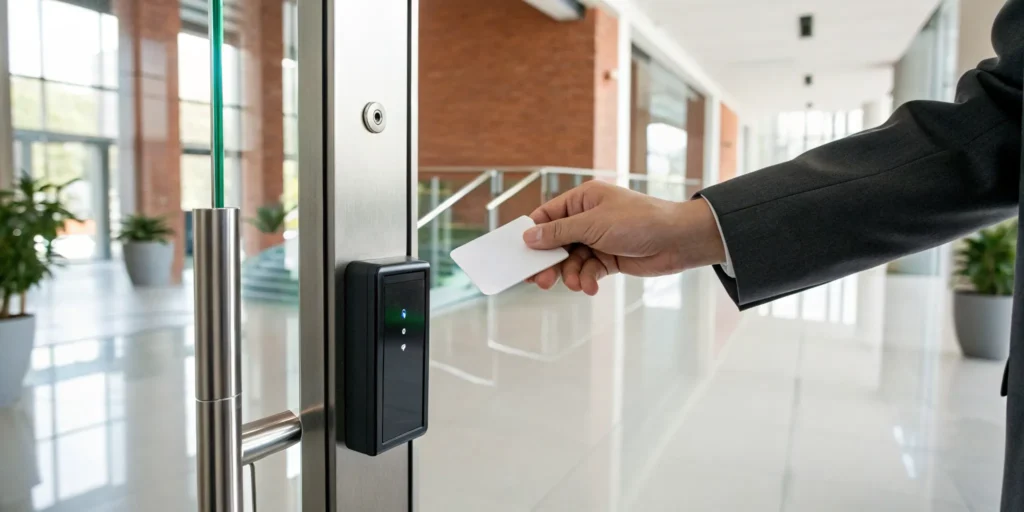
As your business grows, so do your security challenges. That single key that worked for your small Easley startup simply won’t cut it when you have a growing team and more valuable assets to protect. Managing dozens of metal keys becomes impractical, expensive, and insecure. This is where a scalable security solution is essential. A modern key card system is designed to grow with you. You can start by securing just a few critical doors and easily add more as your company expands, giving your business a flexible foundation for long-term security and total peace of mind.
Key Takeaways
- Gain Precise Control Over Your Workspace: Key card systems let you decide exactly who enters specific areas and at what times, making it simple to manage access for employees and visitors without the risks of physical keys.
- Start Small and Scale as You Grow: Modern access control is affordable for businesses of all sizes. You can begin by securing just a few essential doors and expand the system later, making it a cost-effective security upgrade that fits your budget.
- Partner with a Local Expert for Long-Term Success: The technology is only half the solution; a local security provider offers custom system design, professional installation, and reliable 24/7 support to ensure your system works perfectly for years to come.
How Does an Office Key Card System Work?
If you’re tired of fumbling with metal keys, rekeying locks every time an employee leaves, or wondering who has access to sensitive areas, an office key card system is the modern solution you need. Think of it as a smart, digital gatekeeper for your business. Instead of a physical key, your team uses a credential, like a plastic card or a key fob, to gain entry. When they present their card to a reader at the door, the system instantly verifies their identity and permissions before unlocking it.
This entire process happens in seconds, but behind the scenes, a powerful system is at work. It logs every entry attempt, successful or not, giving you a complete record of who is moving through your building and when. This technology not only makes access more convenient but also gives you granular control over your facility’s security. You can decide exactly which doors certain employees can open and even limit access to specific times of day. It’s a significant step up from the one-key-fits-all approach of traditional locks, providing a flexible and secure way to manage your Greenville office.
What Is Electronic Access Control?
At its core, an electronic access control system is all about managing entry. It helps you decide who can enter your building or specific areas inside it, using credentials instead of old-fashioned keys. This technology replaces traditional locks with a more intelligent and manageable solution. Instead of wondering who might have a copy of a key, you have a digital record of every person with access privileges. If an employee leaves, you don’t have to call a locksmith; you simply deactivate their card in the software.
This level of control is the primary benefit. You can grant a new hire access to the main entrance but restrict them from the server room. You can also set time-based rules, allowing your cleaning crew access only after business hours. These access control systems are designed to give you complete command over your property’s security, ensuring only authorized individuals can enter protected areas.
What Are the Main Parts of a Key Card System?
An office key card system is made up of a few key parts working together to keep your business secure. First is the credential, which is the key card, fob, or even a smartphone app that each employee carries. Next is the card reader, the device mounted by the door that reads the information from the credential. When a card is presented, the reader sends the data to the control panel.
The control panel is the brain of the operation. It checks the credential against the access rules you’ve set in the management software. If the user has permission, the panel sends a signal to the electronic lock to open the door. The best part is how these systems can work with other security tools. You can integrate your access control with video surveillance, so a camera automatically records whenever a specific door is opened, creating a more complete security ecosystem for your Greenville business.
System Types: Standalone vs. Networked
When you’re choosing an access control system, one of the first decisions is whether to go with a standalone or a networked setup. A standalone system is a simple, self-contained solution perfect for securing one or two doors. Think of it as programming access directly at the door itself using a keypad. It’s a great starting point for a small business in Mauldin or a specific high-security room. A networked system, on the other hand, connects all your readers to your business’s computer network. This allows you to manage everything from a central software platform, giving you the power to set schedules, track who goes where, and manage user permissions across your entire facility from one screen. It’s the ideal choice for a growing company that needs a scalable and comprehensive security management solution.
Electronic Locks: Maglocks and Electric Strikes
The electronic lock is what physically secures your door, and there are two main types you’ll encounter: magnetic locks (maglocks) and electric strikes. A maglock uses a powerful electromagnet to hold a door shut, releasing only when the power is cut by an authorized scan. They are often used on glass doors or doors that don’t have a traditional frame for a strike. An electric strike is different; it replaces the standard metal plate in your door frame. When it receives the signal to unlock, a small piece inside the strike moves, allowing the door to be pushed or pulled open. The best choice depends on your specific door, frame, and security needs, which is why a professional assessment is so helpful in getting the right hardware for the job.
Lock Settings: Fail-Safe vs. Fail-Secure
Here’s a detail that has huge safety implications: how your locks behave during a power outage. This is determined by their setting, either “fail-safe” or “fail-secure.” A fail-safe lock will automatically unlock when it loses power. This is essential for fire exit doors to ensure people can always get out in an emergency. A fail-secure lock does the opposite—it remains locked when the power goes out, keeping your property secure. This setting is better for protecting sensitive areas like a server room or inventory storage. Choosing the correct setting is critical for both security and meeting local fire safety codes, and it’s a key reason why professional installation is so important. An expert ensures your system is not only convenient but also fully compliant and safe.
Credentials and Readers
Let’s talk about the parts you and your team will interact with every day: the credentials and readers. The credential is the modern-day “key.” It can be a plastic card, a small fob that attaches to your keychain, or even a digital credential stored in a smartphone app. Each credential has a unique identifier. The reader is the small box mounted next to the door. Its job is to scan the credential using technologies like NFC or RFID and send that information to the system’s control panel. The panel then checks if that specific credential has permission to open that door at that particular time. It’s a fast and seamless interaction that forms the foundation of a key card system’s convenience.
Adding Layers with Multi-Factor Authentication (MFA)
For areas that require the highest level of security, a single credential might not be enough. That’s where multi-factor authentication (MFA) comes in. You’re probably already using MFA for your online banking or email—it’s the same principle applied to physical security. Instead of just relying on something you have (the key card), the system requires a second factor for verification. This could be something you know, like a PIN you enter on a keypad at the reader, or something you are, like a fingerprint scan. Using MFA is an excellent way to protect your most critical assets, like a server room in your Clemson office or a file room containing sensitive client information, ensuring that access is doubly verified.
Understanding Key Card Technologies
When you hear “key card,” you might picture a specific type of card, but the technology behind them varies quite a bit. The card itself is just one piece of the puzzle; the real difference lies in how it communicates with the reader to grant access. Each technology offers a unique balance of convenience, security, and cost. Choosing the right one depends entirely on your business’s daily operations, security requirements, and budget. Let’s walk through the most common types you’ll encounter, from the simple swipe to the highly advanced smart card, so you can make an informed decision for your facility.
Magnetic Stripe (Swipe) Cards
You’re likely already familiar with magnetic stripe technology, even if you don’t realize it. It’s the same tech used on hotel keys and older credit cards. These cards have a dark magnetic strip on the back that stores a small amount of data. To open a door, you physically swipe the card through a reader, which deciphers the data and grants access if the credentials are valid. While this method is straightforward and often the most budget-friendly, it has its downsides. The constant friction means both the cards and the readers can wear out over time, and the magnetic strips can be damaged or demagnetized, requiring replacements.
Proximity (RFID) Cards
Proximity cards are a significant step up in convenience and durability. Instead of a swipe, these cards use radio-frequency identification (RFID) to communicate wirelessly with a reader. An employee simply holds their card or fob near the reader—no contact required—and the door unlocks. This “tap-and-go” functionality is perfect for busy environments like hospitals or manufacturing plants in the Upstate where employees might have their hands full. Because there’s no physical contact, both the cards and readers last much longer. They are also considered more secure than magnetic stripe cards, as the data they transmit is more difficult to copy.
NFC Cards
Near Field Communication (NFC) is a specialized subset of RFID technology that you probably use every day with your smartphone for mobile payments. In access control, NFC cards work similarly to proximity cards but require a much closer range—typically less than two inches. This short range is a security feature, preventing accidental reads. The key advantage of NFC is its ability to support two-way communication. The card and reader can engage in a secure “digital handshake” to verify each other, making it a more secure option. This also allows for permissions to be updated on the card wirelessly, offering greater flexibility in managing access rights.
Smart Cards
For businesses that require the highest level of security, smart cards are the gold standard. These cards contain a small, embedded computer chip that can store a large amount of data and perform its own processing using powerful encryption. This makes them extremely difficult to clone or tamper with. When we design systems for facilities with sensitive information or high-value assets, like a research firm in Clemson or a financial institution in Greenville, we often recommend smart cards. Their versatility is another major benefit; a single smart card can be used for building access, network login, cashless vending, and tracking assets, creating a unified and highly secure solution for your entire operation.
Why Make the Switch From Traditional Keys?
If you’re still managing metal keys for your Greenville office, you know the headaches. A lost key means calling a locksmith, a former employee creates a security risk, and you never know who has a copy. Upgrading to an office key card system isn’t just about modernizing; it’s about taking back control. An electronic access control system protects your building, team, and assets. It replaces the uncertainty of traditional locks with the clarity of smart technology, giving you an efficient way to manage who goes where, and when.
Seriously Improve Your Office Security
The biggest drawback of a traditional key is that once it’s out of your hands, you lose control. Keys can be copied, lost, or stolen, leaving your business vulnerable. When an employee leaves, you either hope they return their key or face the expensive process of rekeying your locks. An office key card system eliminates these risks. If a card is lost or an employee departs, you can deactivate it in seconds. This simple action secures your property without a locksmith and is a core component of modern business security, ensuring only authorized people get inside.
Simplify How You Manage Access
Key card systems give you precise control over who can access specific areas. You can grant an employee access to the main entrance but restrict them from the server room, or set time-based permissions for cleaning crews. This makes managing your facility much simpler than tracking dozens of physical keys. Everything is handled from a central interface that creates a detailed audit trail of every entry. You’ll always have a record of who was in the building and when, which is invaluable for accountability. This process removes the guesswork from managing building access.
Track Access with Real-Time Monitoring
A key card system provides data to help you run your business more effectively. The system generates real-time alerts for important events, like a door being propped open or an unauthorized access attempt, so you can respond instantly. These logs also serve practical purposes beyond security, such as verifying employee time and attendance. While it’s wise to choose a system with safeguards against risks like card cloning, modern technology offers highly secure options. This stream of information gives you a clear picture of activity on your property.
Who Uses Key Card Systems? (It’s Not Just Offices)
While we’ve focused on the benefits for a typical office, key card systems are far more widespread than you might think. Their flexibility allows them to be tailored to almost any environment where controlling and monitoring entry is a priority. From the school your kids attend to the hospital you visit for a check-up, this technology is quietly working in the background to keep people and property safe. The ability to set unique permissions for every user makes it the go-to solution for a huge range of industries, each with its own distinct security challenges.
Securing Schools and Universities
Educational campuses are like small cities, with thousands of people moving between dorms, classrooms, labs, and libraries. A key card system is essential for maintaining a safe learning environment. It allows administrators to ensure only students and staff can enter residential halls while also restricting access to sensitive areas like science labs or IT server rooms. In an emergency, the system can be used to instantly lock down specific buildings or the entire campus. This level of dynamic control is impossible with traditional keys and is a critical component of modern campus safety protocols, providing peace of mind for students, parents, and faculty alike.
Protecting Hospitals and Healthcare Facilities
In a hospital or clinic, security is a matter of life and safety. Access control systems are vital for protecting patients, staff, and sensitive information. With a key card system, a hospital in Spartanburg can ensure that only authorized personnel can enter critical areas like operating rooms, pharmacies, and neonatal intensive care units. It also helps maintain patient privacy by restricting access to file rooms where medical records are stored. By creating a detailed log of who enters these zones and when, the system provides a clear audit trail that helps facilities meet strict regulatory requirements and ensures a secure environment for healing.
Managing Access in Apartment Buildings and Hotels
For property managers of apartment complexes and hotels, key cards solve the constant headache of key turnover. Instead of rekeying a lock every time a tenant moves out or a guest checks out, you can simply deactivate their card. This provides a more secure and cost-effective solution for multi-family housing and hospitality. Key cards also allow you to manage access to shared amenities, like a community pool, fitness center, or laundry room, ensuring only current residents or registered guests can use them. It’s a simple upgrade that offers residents in communities like Simpsonville and Greer a more secure and convenient living experience.
Controlling Entry for Gyms and Banks
At first glance, gyms and banks seem worlds apart, but both rely on key card systems to manage access. A 24-hour gym needs a reliable way to let members in after hours while keeping the facility secure from non-members. A key card system automates this process perfectly. Meanwhile, a bank or credit union uses the same technology for much higher stakes: protecting vaults, cash-handling areas, and data centers. The system ensures that only specific employees with the right permissions can enter these high-security zones, creating an essential layer of commercial security and accountability for every transaction.
How to Choose the Right Office Key Card System
Picking the right key card system for your Greenville office is a significant step up from traditional locks and keys. It’s about more than just convenience; it’s about gaining precise control over your workspace and creating a smarter, more secure environment. When you start looking at options, it’s easy to get lost in the technical details. But the process becomes much clearer when you focus on what truly matters for your business. Think about your daily operations. Who needs access to which areas, and at what times? A modern system lets you define these rules with a few clicks.
Beyond basic entry, the best systems are team players. They should integrate smoothly with other security tools you already have, like video cameras, creating a unified defense for your property. It’s also crucial to think about the future. Your business will grow, and your security system needs to be able to scale with you without requiring a complete overhaul. Finally, consider how you manage your business. The ability to handle security tasks remotely from a phone or laptop isn’t just a perk anymore; it’s a fundamental feature for flexible and efficient operations. By keeping these core principles in mind—control, integration, scalability, and accessibility—you can confidently choose a system that protects your assets and simplifies your life.
Must-Have Security Features for Your System
At its core, a key card system is about controlling who can go where, and when. Modern access control systems replace traditional metal keys with credentials like cards, fobs, or even biometrics. This gives you granular control. You can grant an employee access to the main entrance but restrict them from the server room or executive offices. Think about your own workspace: are there areas with sensitive information or valuable equipment? The right system lets you create custom permissions for individuals or groups, and you can set time-based rules so that access is only granted during business hours. This simple step significantly strengthens your building’s first line of defense.
Integration with Intercoms and Visitor Management
A great security system doesn’t work in isolation; it works with your other tools to create a seamless experience. Your key card system can be integrated with an intercom, allowing you to see and speak with visitors at a locked entrance before granting them access. This is perfect for managing deliveries or unscheduled appointments without leaving your desk. For planned visits, you can connect your system to a visitor management platform. This lets you easily issue temporary credentials for clients, contractors, or interviewees that are active only for the duration of their visit. It’s a professional and secure way to welcome guests to your Spartanburg or Anderson office without handing out physical keys or leaving doors unlocked.
Emergency Lockdown Solutions
In a critical situation, your top priority is the safety of your team, and every second is crucial. This is where an integrated lockdown feature becomes an invaluable asset. With the press of a button—either a physical panic button or a command from your computer—you can instantly secure your entire facility. This action overrides all normal access rules and locks every door connected to the system, preventing unauthorized entry. This capability is a vital part of a comprehensive emergency action plan, giving you the power to protect your people and property when it matters most. It’s the kind of peace of mind that allows you to focus on running your business, knowing you are prepared for the unexpected.
Will It Work With Your Current Tech?
Your key card system shouldn’t operate in a silo. The most effective solutions work in harmony with your other security and building management tools. Imagine your access control system communicating with your video surveillance cameras. When a door is accessed, the system can trigger a camera to record a short clip, giving you a visual record of every entry. This integration can also extend to your lighting and HVAC systems. For example, when the last employee swipes out for the day, the system can automatically lower the thermostat and turn off the lights, helping you save on energy costs. Connecting these systems creates a smarter, more efficient, and more secure environment for your business.
Find a System That’s Easy to Use (and Grows With You)
Your business isn’t static, and your security system shouldn’t be either. Look for a solution that can grow with you. Whether you’re starting with two doors in a small Easley office or planning to expand to a larger facility in Spartanburg, a scalable system allows you to add more doors and users without having to replace the entire setup. Just as important is the user interface. The software you use to manage permissions should be intuitive and straightforward. You want a system that makes it easy to add a new employee or revoke access for a departing one in just a few clicks, without needing a technical manual every time.
Why Mobile and Remote Access Is a Game-Changer
In today’s connected world, managing your office security from anywhere is a game-changer. Many modern key card systems are cloud-based, which means you can manage access from a computer or smartphone. If an employee forgets their card or a contractor needs temporary access after hours, you can unlock a door remotely without having to drive to the office. This is a major advantage over older, on-premise systems that can only be managed from a dedicated computer inside the building. Having mobile access gives you the flexibility and peace of mind that comes with knowing you’re always in control of your office security, no matter where you are.
Pro Tips for a Future-Proof Investment
Investing in a key card system is a big decision, and you want to make sure the system you choose today will still serve you well five or ten years from now. A future-proof system is one that’s flexible, cost-effective, and secure against tomorrow’s threats. It’s not just about the technology you buy, but also about the strategy behind your purchase. By thinking ahead, you can avoid costly replacements and ensure your security investment grows with your business, rather than holding it back. Here are a few pro tips to help you make a smart, long-term choice for your Greenville-area business.
Choose Open-Architecture Systems
When you’re shopping for a system, you’ll hear terms like “proprietary” and “open-architecture.” A proprietary system locks you into a single manufacturer for all your components—from the software to the card readers. An open-architecture system, on the other hand, is designed to work with hardware and software from different brands. Choosing an open-architecture platform is one of the smartest moves you can make. It gives you the freedom to mix and match components to build the best possible system for your needs and budget. It also protects you from being stuck if your original vendor raises prices, discontinues a product, or goes out of business. You’ll have the flexibility to upgrade or replace individual parts without having to overhaul your entire system.
Consider Wireless Readers for Older Buildings
The cost of running wires can be a surprisingly large part of an access control installation budget, especially in older buildings. If your business is located in one of Greenville’s historic downtown properties or a building with thick plaster or brick walls, extensive wiring might be difficult, expensive, or even damaging to the structure. This is where wireless readers can be a fantastic solution. These devices communicate with the central control panel without a physical data cable, drastically reducing installation time and labor costs. By using wireless technology, you can secure doors that would have been impractical to wire, all while preserving the integrity and aesthetics of your space.
Ensure Hardware is NDAA Compliant
You might see the term “NDAA compliant” and think it only applies to government buildings, but it’s something every business owner should pay attention to. The National Defense Authorization Act (NDAA) includes a section that bans the use of certain video surveillance and telecommunications equipment from specific foreign manufacturers due to security concerns. While this is a legal requirement for federal agencies and contractors, choosing NDAA-compliant hardware is a best practice for everyone. It means you’re investing in equipment that has been vetted for security and isn’t tied to known vulnerabilities. This ensures your system is trustworthy and protects your business from potential cyber threats, giving you peace of mind that your security investment is truly secure.
What to Look For in a Greenville Security Partner
Choosing the right key card system is a big decision, but the technology itself is only half the story. The other, more important half is the partner you choose to install and support it. A great security partner acts as an extension of your team, someone who understands the local business landscape and is invested in your success. This isn’t just about buying hardware; it’s about building a relationship with a provider who will be there for you long after the installation is complete. For Greenville businesses, finding a partner who offers local expertise, custom-fit solutions, and unwavering support is the key to a truly effective security strategy.
Why Choose a Local Expert like ADP?
When your security is on the line, you want someone who can be there fast. Working with a local Greenville expert means you get prompt, on-site service from technicians who are part of your community, not just a name on a national call center list. A local team understands the specific needs of businesses in the Upstate, from Greer to Simpsonville. They are more accountable and genuinely invested in keeping our community safe. Plus, they’re familiar with the latest trends and technologies, including modern touchless access options that help create a healthier and more secure workplace for your employees and visitors.
Getting a System Tailored to Your Business
Your business is unique, and your security system should be too. A one-size-fits-all approach simply doesn’t work. The right partner will take the time to understand your specific operations, your building’s layout, and your biggest security concerns before recommending a solution. They will design a system that fits your workflow, whether you run a small retail shop or a large office complex. This process is about more than just replacing old-fashioned keys; it’s about creating a streamlined, intuitive system that protects your assets and people without getting in the way of your work. A custom solution ensures you get exactly what you need.
24/7 Support You Can Count On
A security system works around the clock, and your support team should be just as reliable. Your relationship with your security partner shouldn’t end once the installation is finished. What happens if a key fob stops working or you need to revoke access for a former employee after hours? You need a partner who provides dependable, ongoing support and maintenance to ensure your system always performs at its best. Look for a provider who offers 24/7 assistance, giving you the confidence that help is always just a phone call away. This continuous support is what turns a good security system into true peace of mind.
How Much Does a Key Card System Cost?
When you’re thinking about upgrading your office security, one of the first questions that comes to mind is, “What’s this going to cost?” It’s a practical and important question for any business owner in Greenville. The truth is, the price of a key card system isn’t a simple, one-size-fits-all number. The final cost depends entirely on your specific needs, like the number of doors you need to secure, the type of hardware you choose, and the complexity of your building’s layout.
Think of it less as a flat expense and more as a strategic investment in your business’s safety and efficiency. A well-designed system protects your assets, simplifies employee access, and gives you valuable oversight of who is coming and going. To help you create a realistic budget, let’s break down the main costs you can expect: the initial installation, ongoing maintenance, and how the system can scale with your business. This way, you can make an informed decision that feels right for your company.
What Goes Into the Initial Installation Cost?
The primary investment for a key card system is the initial setup. Generally, you can expect the access control system pricing to fall somewhere between $1,000 and $3,000 per door. This price typically covers all the essential hardware, including the card readers mounted on the wall, the electronic locks, the control panels that act as the system’s brain, and all the necessary wiring to connect everything. It also includes the labor for professional installation and network configuration. The final cost per door will vary based on the specific technology you select and the unique requirements of your building.
Hardware, Setup, and Software Costs Per Door
The most straightforward way to budget for a new system is to look at the cost per door. This figure typically includes all the essential hardware needed to make a single entryway secure: the card reader, the electronic lock mechanism, the control panel that manages it, and the necessary wiring. It also covers the professional labor for installation and getting the system configured on your network. While the price can vary based on the technology you choose, you can generally expect the initial setup cost to be between $1,000 and $3,000 per door. This all-in-one approach ensures that each access point is fully integrated and ready to go from day one, taking the guesswork out of piecing together a system on your own.
The Price of Individual Key Cards and Fobs
Beyond the door hardware, you’ll need to budget for the credentials your team will use every day. Fortunately, this is one of the more affordable parts of the system. Modern, secure credentials like RFID key cards or key fobs are quite inexpensive, usually costing between $5 and $10 each. When you compare that small, one-time expense to the cost and hassle of calling a locksmith to rekey a door every time a physical key is lost, the value is clear. You can easily order a batch for your current team and keep a few extras on hand for new hires, making the process of issuing access simple and cost-effective.
Budgeting for Hidden Costs
A quote for hardware and installation gives you a great starting point, but it’s important to consider the total first-year cost to get a complete financial picture. Often, there are other expenses to account for, such as annual software licensing fees, the cost of replacing lost or damaged cards, and the staff time required to manage the system. These additional factors can sometimes add 25-40% to your initial investment. A transparent security partner will walk you through all these potential costs upfront, ensuring there are no surprises down the road. At ADP, we believe in providing a clear, comprehensive plan so you can budget accurately for a system that serves your Greenville business for years to come.
Planning for Ongoing Maintenance and Fees
Beyond the upfront installation, you should also budget for ongoing software and maintenance fees. Most modern access control systems operate using sophisticated software that requires regular updates to remain secure and functional. These fees usually range from $30 to $50 per month. This subscription ensures your system receives critical security patches, new features, and technical support when you need it. While it might seem like an extra expense, this ongoing maintenance is what keeps your security investment working effectively and protects it from evolving digital threats, making it a crucial part of the overall average cost per door.
Annual Maintenance and Hardware Replacement Cycles
Just like any other technology in your office, the physical components of your key card system have a lifespan. It’s smart to plan for this from the beginning. Commercial-grade hardware, such as your electronic locks and card readers, is built to last, but you should anticipate a replacement cycle of about every 7 to 10 years. This isn’t an unexpected emergency but a predictable part of your long-term security budget. A good security partner will help you factor this into your initial planning, ensuring you’re prepared for the future without any surprises down the road. Regular maintenance also extends the life of your hardware, making those ongoing service fees a valuable investment.
It’s also wise to build a small cushion into your budget. A good rule of thumb is to add about 10–15% to your total estimate for unexpected costs that might pop up during installation or for small repairs. Proactive annual maintenance helps minimize these surprises by catching potential problems early, but having a contingency fund is a sound business practice. By planning for both routine upkeep and eventual hardware replacement, you can ensure your security system remains a reliable asset for your Greenville business for years to come.
How Business Size Impacts Your Budget
One of the best features of modern key card systems is their scalability. You don’t have to be a massive corporation to afford this level of security. Whether you run a small retail shop in Easley or a growing office in Spartanburg, access control systems can be tailored to fit your exact needs and budget. You can start by securing just one or two critical doors and then easily expand the system as your business grows. This flexibility makes it a cost-effective solution that provides far more security and control than traditional locks and keys, allowing you to build a system that protects your business without overspending.
Common Myths About Key Card Systems, Busted
When you’re thinking about upgrading your office security, it’s easy to run into information that feels conflicting. Key card systems are a fantastic solution for many Greenville businesses, but a few persistent myths can cause hesitation. Let’s clear the air on some of the most common concerns so you can make a decision with confidence.
Are They Really More Secure Than Locks?
One of the first questions business owners ask is about digital security. A common misconception is that electronic access systems are easily hacked. While it’s true that no security system is completely infallible, modern key card systems are built with robust security features like data encryption to protect against unauthorized access. Think about it this way: it’s far easier for a disgruntled former employee to make a copy of a metal key than it is for them to bypass a secure, encrypted electronic system. With a key card, you can revoke access instantly, a level of control that traditional locks simply can’t offer.
Aren’t They Too Expensive and Complicated?
The idea that access control is prohibitively expensive often stops business owners from exploring their options. The reality is that these systems are surprisingly cost-effective because they are completely scalable. Your business in Spartanburg doesn’t need the same setup as a major facility, and your system can reflect that. You can start with securing just a few critical doors and expand as your company grows. This flexibility allows you to invest in what you need right now, making it a practical security upgrade for businesses of all sizes, not just large corporations.
Is Managing Employee Access a Huge Hassle?
Some people believe that managing a key card system is a complicated, one-size-fits-all chore. In fact, the opposite is true. The main attraction of modern access control is its customizability. You can set specific permissions for different employees or departments, granting access only to the areas they need. When an employee leaves, you don’t have to change the locks; you just deactivate their card from the system in real-time. This instant control simplifies management and removes the security risks and costs associated with lost or unreturned keys, making your day-to-day operations smoother and more secure.
What Are the Real Security Risks?
While a key card system is a massive improvement over traditional locks, it’s important to understand the potential vulnerabilities so you can choose the right technology. Not all systems are created equal, and being aware of the risks helps you make a smarter investment. The good news is that modern solutions have addressed many of the security gaps found in older systems. By working with a knowledgeable partner, you can design a system that minimizes these risks and keeps your Greenville business secure. Let’s look at a few common concerns and how to handle them.
The Threat of Copied or Cloned Cards
One of the main worries is the possibility of a card being copied. This is a valid concern, especially with older technologies like magnetic stripe or basic proximity cards. As the technology has advanced, so have the security measures. Modern key cards use advanced encryption to make cloning extremely difficult. When you’re designing your system, it’s crucial to select a card technology that offers this higher level of security. This is where an expert can guide you toward the right hardware to prevent unauthorized duplication and protect your facility.
Managing Lost or Damaged Cards
A lost or damaged card can be more than just an inconvenience; it can create a temporary security gap until it’s reported and deactivated. It can also cause delays for employees trying to get into the building. The key to managing this effectively is a system that allows for remote administration. Instead of having to be at a specific computer on-site, a cloud-based system lets you instantly deactivate a lost card from your phone or laptop. This immediate response ensures your building remains secure and minimizes disruption to your daily operations.
Challenges with Older, On-Premise Systems
If you’re considering a used or outdated system, be aware of its limitations. Older, on-premise systems can be difficult to manage, especially as your business grows. They often lack the flexibility to scale easily, meaning you might face a complete and costly overhaul if you expand your facility or open a new location in the Upstate. These systems also lack the remote management capabilities that make modern solutions so convenient. Investing in a scalable, modern system from the start ensures your security can grow alongside your business without creating future headaches.
Beyond Key Cards: Other Access Control Options
While key cards are the most common solution for office access control, they aren’t the only option available. Depending on your security needs and operational workflow, other types of credentials might be a better fit for certain areas or situations. Advanced technologies like biometrics offer a higher level of security for sensitive zones, while mobile and QR code access provide incredible flexibility for managing visitors and temporary staff. Understanding these alternatives can help you create a more comprehensive and customized security plan for your business. Let’s explore a couple of popular options that go beyond the traditional plastic card.
Biometric Access Control
For areas that require the highest level of security, biometric access control is the gold standard. Instead of using a card or fob that can be lost or stolen, these systems use a person’s unique biological traits to grant access. The most common forms are fingerprint scanners and facial recognition readers. Because these credentials can’t be shared or duplicated, they provide an almost foolproof way to ensure that only specific, authorized individuals can enter a highly sensitive area. Many businesses in the Greenville area use biometric readers to protect server rooms, research labs, or executive offices where confidential information is stored.
QR Code Access Control
Managing access for visitors, contractors, or interview candidates can be a hassle. QR code access offers a simple and secure solution. With this technology, you can generate a unique QR code that acts as a temporary digital key. You can email or text the code to your visitor, and they simply scan it at the door reader to gain entry. The best part is that you can set specific permissions for each code, such as limiting access to a certain timeframe or specific doors. This is an excellent way to streamline visitor management without compromising security or handing out physical cards that you have to track down later.
Your Checklist for a Smooth Installation
A successful transition to a key card system goes beyond just picking the right hardware. Proper planning ensures the installation process is seamless and that your team is ready from day one. By thinking through the details beforehand, you can avoid common hiccups and make sure your new system delivers on its promise of better security and convenience. Here’s what to focus on as you prepare for the upgrade.
Making the New System Work With Your Old Tech
A modern access control system can do more than just open doors. When planned correctly, it can become a central hub for your building’s operations. Think about the other technology you use daily, like a smart thermostat, alarm system, or automated lighting. A great key card system should be able to integrate with these platforms. This allows you to create a smarter, more efficient workplace. For example, you could program the building to automatically adjust the temperature when the first employee swipes in. Discussing these possibilities with your security partner early on is key to maximizing your investment.
How to Get Your Team Ready for the New System
Your new key card system is only effective if your team knows how to use it. Since access control systems are customizable to fit your specific needs, you can’t assume everyone will intuitively understand the new features. A clear training plan is essential. Before the system goes live, schedule a session to walk everyone through the basics: how to use their new credentials, what to do if a card is lost, and who to contact with questions. Explaining new policies, like different access levels, prevents confusion and helps your team feel confident from the start.
What to Expect on Installation Day
Knowing what to expect on installation day helps you prepare your space and team. A technician will install the physical hardware, like card readers and electronic locks, and set up the central management software. It’s important to ask your provider about the technology they use. Some older systems run on dedicated, on-site computers and can’t be managed remotely. Modern, cloud-based solutions offer the flexibility to manage access from anywhere with an internet connection. This lets you grant or revoke access and handle lockouts without being at the office. Confirming these details beforehand ensures you get a system that fits your business.
Your Next Steps for a More Secure Office
Making the switch to a key card system is a big step, but it doesn’t have to be complicated. The key is to find a solution that fits your business like a glove, not a one-size-fits-all product that leaves you with features you don’t need or gaps in your security. By taking a moment to think through your specific requirements and partnering with a local team that understands the Greenville business landscape, you can create a secure, streamlined environment for your employees and assets. It’s all about finding the right fit and the right partner to guide you.
Start by Assessing Your Office’s Needs
Before you start looking at hardware, take a walk through your facility. Which doors need to be secured? Is it just the main entrance, or do you also have server rooms, inventory closets, or executive offices that require limited access? Think about who needs to get where and when. Modern access control systems replace old-fashioned keys with cards, fobs, or even biometrics, giving you precise control over who can enter specific areas. Making a simple list of these “must-secure” zones and “must-have-access” employee groups will give you a clear starting point and make the selection process much smoother.
Schedule a Consultation With Our Experts
Once you have a good idea of what you need, the next step is to talk to a professional. A local security expert can look at your list, assess your physical space, and recommend a system tailored to your business and budget. Instead of trying to piece together a solution on your own, a consultation helps you understand your options and find the most effective setup. We can help you design a custom security solution that addresses your unique challenges, ensuring your Greenville office is protected by a system that’s both powerful and easy to manage.
Related Articles
- Access Control Systems Greenville SC: The Ultimate Guide
- Best Business Alarm Systems Greenville SC: A Buyer’s Guide
- Fire Alarm System Design for Greenville, SC Business
Frequently Asked Questions
What do I do if an employee loses their key card or leaves the company? This is one of the best parts of having an electronic system. Instead of calling a locksmith to rekey the entire office, you simply log into the management software and deactivate the lost or unreturned card. The process takes only a few seconds, and that credential will no longer grant access to your building, instantly securing your property.
Are these systems affordable for a small business, or are they only for large corporations? Key card systems are surprisingly scalable, which makes them a great fit for businesses of any size. You don’t have to secure every single door at once. You can start with the most critical entry points, like your main entrance and server room, and then add more doors as your business grows. This allows you to make a smart investment that fits your current budget.
Can I manage building access even when I’m not physically at the office? Yes, absolutely. Modern, cloud-based systems give you the flexibility to manage your office security from anywhere using a smartphone or computer. If a delivery arrives after hours or an employee forgets their card, you can remotely unlock the door for them without having to drive back to the office. This remote capability gives you constant control and peace of mind.
How does a key card system work with other security tools like cameras? A great key card system can integrate with your other security technology to create a more complete solution. For example, you can connect it to your video surveillance system so that a camera automatically records a clip whenever a door is opened. This gives you a visual record of every entry, pairing the “who” from the access log with a clear video of the event.
Is an electronic system truly more secure than a traditional lock and key? While a sturdy lock is good, its weakness is the key itself. A physical key can be copied without your knowledge, and you lose all control once it’s out of your hands. An electronic system solves this problem. You have a complete audit trail of every entry attempt, and you can revoke access instantly. This level of control and detailed oversight makes it a significantly more secure way to protect your business.