How to Secure a Warehouse Against Unauthorized Entry
November 6, 2026
How to Test Glass Break Sensors Without Breaking Glass
November 7, 2026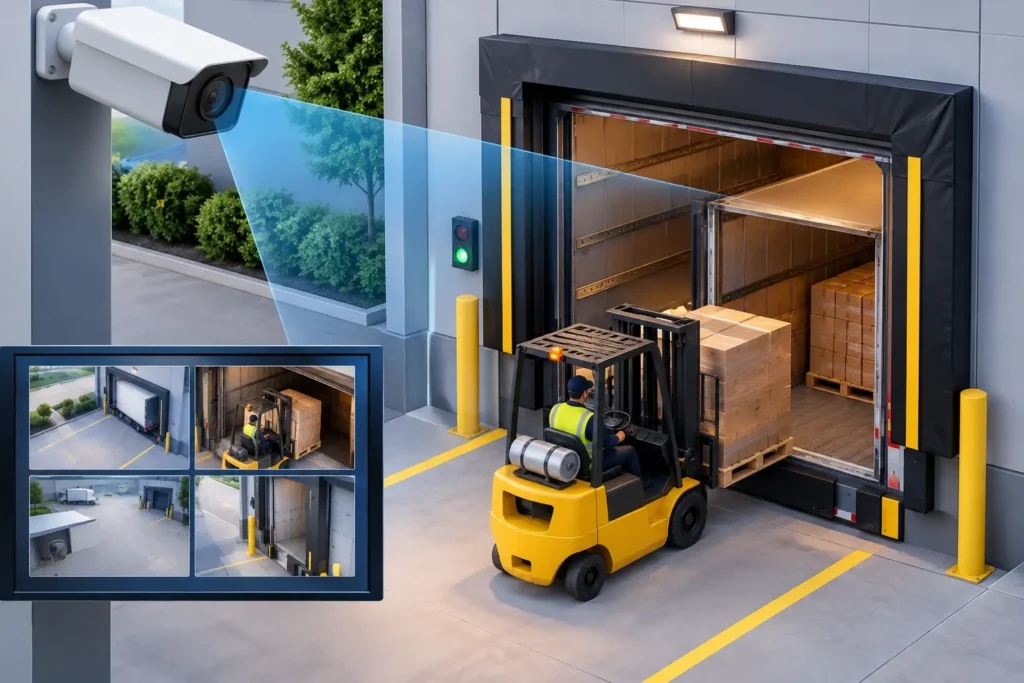
A loading dock can change from quiet to chaotic in minutes. Trucks arrive early, pallets move quickly, doors open and close, and several employees or drivers may share the same space. The right loading dock camera features give business owners and facility managers a clear record of what happened when a shipment is damaged, a delivery is disputed, or activity occurs after hours.
For South Carolina businesses, a dock camera should do more than provide a general view of the building. It should help document the transfer of goods, identify people and vehicles, deter theft, and support a faster response when something does not look right.
Which Loading Dock Camera Features Matter Most?
The best equipment depends on the size of the dock, the value of inventory, traffic volume, lighting conditions, and whether the area is staffed overnight. A small receiving area may need one carefully placed camera, while a busy warehouse may need coverage at every bay, entrance, and staging lane.
These are the features that make the biggest difference in daily use:
- High-resolution video helps distinguish labels, pallet conditions, faces, and vehicle markings. For most docks, 4MP or 4K cameras provide more usable detail than older standard-definition systems.
- Wide dynamic range balances bright outdoor sunlight with the darker interior of a loading bay. Without it, a person standing near an open dock door can appear as a dark silhouette.
- Low-light and infrared capability keep coverage useful before sunrise, after closing, and during poor weather. Some locations benefit from supplemental lighting rather than relying only on infrared video.
- Varifocal lenses allow a professional installer to adjust the field of view for a specific lane, door, or gate. This is often more effective than installing a wide-angle camera and hoping it captures useful detail at a distance.
- Remote viewing and alerts let authorized managers check activity from a phone, tablet, or computer. Alerts can be set for after-hours movement, people entering a restricted zone, or vehicles approaching a gate.
A camera with every available feature is not automatically the best answer. Higher resolution requires more bandwidth and storage. Advanced analytics can reduce unnecessary notifications, but they need proper setup or they may generate alerts for forklifts, shadows, rain, or normal employee activity.
Capture the Full Chain of Custody
A single camera mounted above a dock door rarely tells the complete story. It may show a truck arriving but miss the condition of the shipment, who handled it, or whether a pallet was left unattended in a staging area.
Effective dock coverage follows the movement of goods. One camera may watch the approach lane and capture the truck, trailer number, and arrival time. Another can cover the dock door and the handoff between the trailer and facility. A third may watch the interior staging area where shipments wait to be scanned, loaded, or moved into storage.
This approach is particularly valuable when resolving common disputes. If a carrier says an item was delivered intact, recorded video may show whether the box arrived damaged. If a customer reports a shortage, footage and timestamped access records can help determine whether the issue occurred at receiving, during storage, or during outbound loading.
Coverage should also include pedestrian doors, employee entrances, gates, and areas where high-value inventory is staged. The goal is not to watch every square foot unnecessarily. It is to eliminate blind spots at the points where custody changes hands.
Vehicle Identification Requires Planning
Capturing a truck entering the property is different from reading a license plate or identifying a trailer number. A broad overview camera is useful for general activity, but it may not provide enough pixels to identify details on a moving vehicle.
For vehicle identification, camera placement, viewing angle, and lighting matter as much as resolution. Headlights, reflections, speed, and a sharply angled view can all limit usable footage. A dedicated camera aimed at an entrance or gate may be appropriate for facilities that need dependable vehicle documentation.
Use Analytics Carefully at Busy Docks
Modern commercial camera systems can recognize people, vehicles, line crossing, and movement in defined areas. At a loading dock, those capabilities can help managers focus on exceptions instead of reviewing hours of routine footage.
For example, an after-hours alert can notify a manager when a person enters the dock zone after the facility closes. A line-crossing rule can flag activity near an exterior door or fenced storage area. Vehicle detection may help identify unexpected activity at a gate or delivery lane.
Analytics work best when they support a clear operating procedure. Someone must know who receives alerts, which events require a response, and when law enforcement or a monitoring provider should be contacted. A camera alert is valuable only when it reaches the right person in time to act.
Avoid relying on motion detection alone in an active dock environment. Forklifts, loading equipment, changing light, and weather can trigger frequent recordings. Person and vehicle classification usually offers a more practical starting point, especially for outdoor areas.
Storage, Search, and Evidence Quality
When a delivery dispute appears weeks later, the question becomes simple: Is the footage still available and easy to find? Storage planning is one of the most overlooked loading dock camera features.
Retention needs vary. A business with low shipment volume may be comfortable retaining video for 30 days. A facility handling costly goods, regulated materials, or frequent carrier claims may need 60, 90, or more days of recorded footage. Higher resolution, more cameras, continuous recording, and longer retention all increase storage requirements.
It also helps to choose a system that makes footage easy to search by date, time, camera, or event type. Clear timestamps are essential. Cameras and recording equipment should be set to the correct time and checked regularly, because even a small time difference can complicate an investigation.
For critical incidents, authorized staff should be able to export video promptly while preserving the original recording. Documenting who reviewed and saved the footage can strengthen its value during an insurance claim, employee investigation, or legal dispute.
Build Cameras Into the Larger Security Plan
Dock cameras are strongest when they work alongside access control, intrusion detection, lighting, and alarm monitoring. If an access-controlled door is opened at 2:15 a.m., a manager should be able to review the camera footage associated with that event. If an intrusion alarm activates near a receiving area, video can help verify what is happening before responding personnel arrive.
Good lighting deserves special attention. Cameras cannot create detail that lighting and placement make impossible. Exterior lighting should support safe work conditions without shining directly into the lens. Inside the dock, lighting should account for open doors, overhead fixtures, and the shadowed space inside trailers.
Physical protection matters, too. Outdoor cameras need weather-rated housings suited to heat, humidity, rain, and dust. Cameras placed where forklifts operate or where trailers back in may need protective mounting locations or guards. Equipment should be mounted high enough to reduce tampering while still providing an angle that captures faces and activity.
Professional Installation Prevents Expensive Gaps
A camera system can look complete on a floor plan and still fail at the moment it is needed. Poor mounting height can make faces unrecognizable. A lens aimed toward direct sunlight can wash out the image. A camera positioned too far from a loading lane may record movement without revealing what was loaded or unloaded.
A professional site assessment identifies these issues before equipment is installed. It also considers cable routes, network capacity, electrical needs, storage goals, privacy expectations, and how supervisors will actually use the system. ADP Security Systems helps South Carolina businesses evaluate commercial security needs with professionally installed equipment and ongoing support.
Start With the Questions That Affect Your Dock
Before selecting cameras, walk the dock during a normal receiving period and again after dark. Consider where drivers check in, where goods pause, where employees enter, and where someone could remove property without being seen. Ask how long video must be kept, who needs remote access, and what events should produce an alert.
The most useful system is not the one with the longest feature list. It is the one that gives your team clear, dependable evidence at the moments that matter – from the truck’s arrival to the final movement of the shipment.