Pendant Versus Smartwatch Emergency Alerts
August 30, 2026
Wired Versus Wireless Security for Your Property
September 3, 2026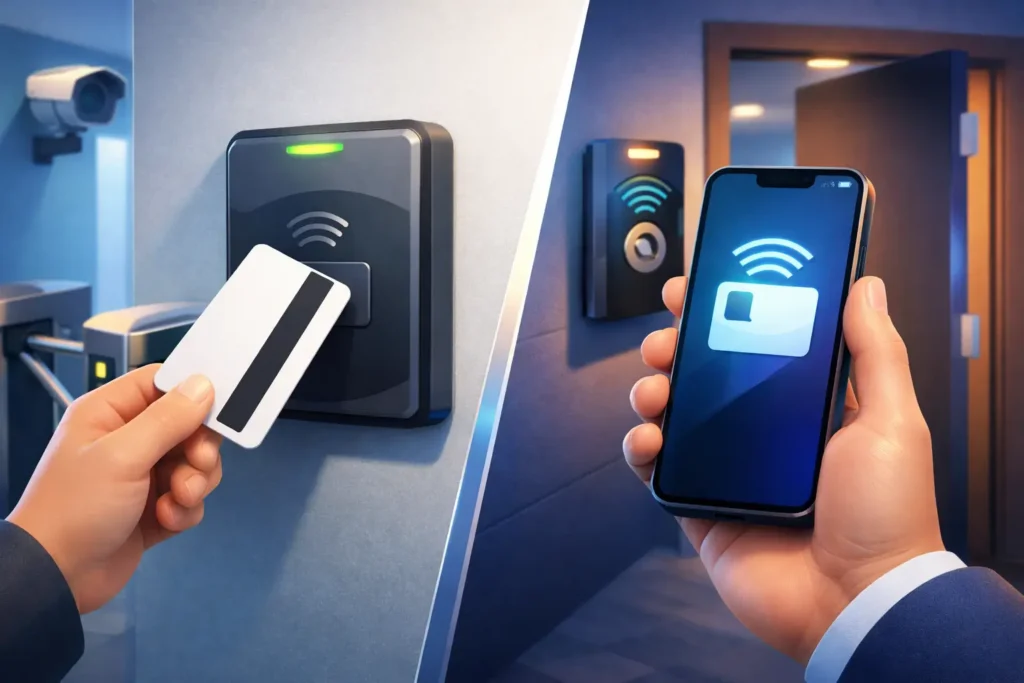
A former employee’s keycard still working at a side entrance is a small oversight with a large consequence. The choice between keycards versus mobile credentials affects how quickly your team can remove access, respond to lost credentials, and keep daily movement through your facility practical. For South Carolina businesses, the right answer is rarely about choosing the newest technology. It is about choosing access control that people can use reliably and management can oversee with confidence.
A professional access control system can support either option, or a combination of both. The best fit depends on your building, the people entering it, the level of protection required, and how your operation runs after normal business hours.
What keycards and mobile credentials do
Keycards are physical credentials that employees, tenants, or approved visitors present to a reader. They may be proximity cards, smart cards, fobs, or badges with embedded access technology. When a valid card is presented, the system records the event and releases the programmed door or gate.
Mobile credentials place that authorization on a smartphone or, in some cases, a wearable device. The user holds or taps the phone near a compatible reader, usually through Bluetooth or near-field communication. The access control platform verifies the credential and opens the authorized door.
Both approaches can give a property owner far more control than traditional keys. Access can be assigned by person, door, time of day, and day of the week. A manager can review door activity, restrict access to sensitive areas, and disable a credential without collecting and rekeying metal keys.
The difference is not whether one method is secure and the other is not. It is how each method fits the daily realities of your people and property.
Keycards versus mobile credentials: the practical differences
For many organizations, keycards remain the simplest starting point. They are familiar, quick to issue, and easy for nearly anyone to use. A card or fob does not require an employee to own a compatible smartphone, install an app, maintain a data plan, or keep a phone charged. That can matter in manufacturing, healthcare support areas, warehouses, schools, and workplaces with a broad range of job roles.
Physical credentials also work well for shared access. A designated card can be issued for a contractor, cleaning crew, delivery point, or after-hours vendor, then deactivated when the work is complete. Badge-based access can also support a clear visual identification process for organizations that want employees to display identification while on site.
The downside is that cards are easy to misplace, loan to another person, or leave behind. Replacing a lost card has a cost, even when the cost is modest. More importantly, an unreported lost card can remain active until someone notices. Cards also need to be managed carefully. Lower-security card formats can be copied with readily available equipment, which is why the card technology and reader configuration matter as much as the card itself.
Mobile credentials reduce the need to distribute and replace physical cards. A new employee may receive access remotely before their first day. If a person changes roles or leaves the company, an administrator can remove access from the system promptly. Since people tend to notice a missing phone quickly, a lost mobile credential may be reported sooner than a missing card tucked into a wallet or glove compartment.
A phone can also offer additional protection through the device’s screen lock, passcode, fingerprint, or facial recognition. Depending on the system and configuration, mobile credentials can use encrypted communication and be tied to an individual user rather than a shared item. These features can strengthen accountability, especially when access needs to be audited after an incident.
Still, mobile credentials are not automatically the better choice for every door. Employees may have dead batteries, forgotten phones, damaged devices, or personal concerns about using their own phone for work access. Some sites do not allow phones in secure or safety-sensitive areas. Reliable access plans need to account for those situations rather than assuming every employee will carry a working smartphone at every shift.
Security depends on the entire system
A credential is only one part of access control. The reader, door hardware, software, network configuration, administrative policies, and installation quality all affect the result. A modern encrypted mobile credential cannot correct a poorly secured door frame. A high-security card cannot help if a former employee’s access remains active for weeks.
Start with the doors that create the greatest exposure. Exterior entrances, server rooms, inventory cages, medication storage, financial records areas, and equipment rooms may need more control than a general office hallway. Your system can assign different credential rules to different areas instead of treating every opening the same way.
It is also wise to decide who can create, change, and remove credentials. A clear process for onboarding and offboarding is often more valuable than adding technology without a plan. When a manager reports a termination, role change, or lost credential, authorized staff should know exactly how quickly access will be adjusted and who confirms completion.
For higher-risk locations, some businesses combine credentials with cameras at key entrances. Access event records can then help a manager verify who entered, when they arrived, and whether a door was propped open. This is useful for resolving routine questions as well as investigating suspicious activity.
Cost is more than the price of a card or app
Keycards can have a lower upfront cost when a business already has compatible readers and needs a straightforward deployment. The ongoing expense includes replacement cards, printers or badging supplies when applicable, and administrative time spent issuing and retrieving credentials.
Mobile credentials may reduce replacement costs and make remote enrollment easier, but they can require compatible readers, software licensing, and setup work. A facility with older access hardware may need upgrades before mobile access is an option. Those upgrades can be worthwhile when they also improve encryption, reporting, and system management, but they should be planned around business needs rather than purchased for convenience alone.
Consider the cost of disruption as well. If staff regularly forget cards, wait for someone to let them in, or struggle to enter during a shift change, productivity suffers. If a manager needs to travel to the building every time access must be changed, administration becomes slower and more expensive. A system that fits the way your team actually works can save time every week.
A hybrid approach often makes the most sense
You do not have to make every user choose one method. Many businesses issue mobile credentials to office staff and managers while keeping cards or fobs available for employees who prefer them, do not use smartphones at work, or need a reliable backup.
This mixed approach is especially practical for facilities with varied users. An office administrator may appreciate mobile access and remote credential updates. Warehouse staff wearing gloves may prefer a fob. A temporary worker may receive a time-limited card. A property manager can use one platform to oversee all of them.
A hybrid plan also helps during the transition from older card technology. Instead of replacing every reader and credential at once, a business can prioritize exterior doors, executive areas, or newly renovated spaces. The result is a measured upgrade that protects operations and supports future expansion.
Questions to answer before choosing
Before selecting a credential type, look at the people and doors involved. How many users need access? Do they work on site every day, rotate shifts, or visit occasionally? Are personal phones allowed in the areas they enter? Does your organization need visible badges, detailed audit records, or temporary visitor access?
Also consider the failure plan. Every access system should define what happens when power is interrupted, a phone battery dies, an internet connection is unavailable, or an employee loses a credential after hours. The right door hardware and professional configuration can help maintain safe egress while controlling entry. Fire and life-safety requirements must always be considered when access-controlled doors are designed or modified.
Finally, think about support. Access control is not a set-it-and-forget-it purchase. Your business needs help from someone who can assess the site, install equipment correctly, train authorized users, and be available when a door, credential, or software setting needs attention.
For some South Carolina businesses, a well-managed keycard system is the most dependable answer. For others, mobile credentials provide the flexibility and control they have been missing. ADP Security Systems can help evaluate the doors, risks, workflows, and life-safety requirements behind that decision, so your access system supports the people who rely on it every day.