Home Security Installation Without Drilling: A Renter-Friendly Guide
November 3, 2026
Cloud Storage Versus Local Recording for Security
November 4, 2026
Last Updated: November 3, 2026
Quick Summary
A smart lock retrofit replaces only the interior thumb turn of your existing deadbolt with a motorized, app-connected unit, leaving your exterior hardware, keyway, and door cutouts unchanged. It fits standard single-cylinder deadbolts with a horizontal thumb turn, door thickness of 1-3/8 to 1-3/4 inches, and a 2-3/8 or 2-3/4 inch backset.
- Mortise locks, multipoint systems, and integrated handle-and-lock combos generally will not accept a retrofit adapter.
- Fix a deadbolt that binds or drags before adding a motor, or batteries will drain quickly.
- Retrofit installation typically needs only a screwdriver, with no drilling and no exterior work.
- Built-in Wi-Fi units trade convenience for more frequent charging than low-power hub protocols.
- Renters should choose retrofit locks because nothing touches the exterior, so nothing violates a lease.
Table of Contents
- What a Smart Lock Retrofit Actually Changes on Your Door
- Smart Lock Compatibility With Existing Deadbolt Hardware
- Best Smart Lock for Existing Deadbolt: Four Retrofit Options Compared
- Retrofit Smart Lock Installation: Tools, Time, and Fit Testing
- Retrofit Smart Lock Wi-Fi: What Needs a Bridge and What Does Not
- Security and Failure Modes Nobody Warns You About
- Renters, Shared Households, and Total Cost of Ownership
- Get Your Deadbolt Assessed Before You Buy
- Frequently Asked Questions
What a Smart Lock Retrofit Actually Changes on Your Door
A smart lock retrofit for deadbolts replaces only the interior thumb turn of your existing lock with a motorized, app-connected unit.
That distinction matters more than most buying guides admit. A full replacement means new exterior trim, new keys, and possibly new door prep.
Below, we break down what actually fits, what does not, and which retrofit options are worth the money.
Smart Lock Compatibility With Existing Deadbolt Hardware
Compatibility is the whole ballgame with a smart lock retrofit. Most retrofit units are built for a standard single-cylinder deadbolt with a horizontal thumb turn on the interior side. If your door matches that description, your odds are good.
The variables that decide fit are unglamorous but decisive. Here is how to actually check each one instead of eyeballing it.
Door thickness
Measure the edge of the door, not the face, at the deadbolt bore. Standard residential doors run about 1-3/8 inches to 1-3/4 inches thick. Most retrofit adapters are designed around that range, but the mounting plate and through-bolt length are what actually constrain you. A thicker door can leave the adapter short of clamping force; a thinner door can leave the plate loose.
Backset
Backset is the distance from the door edge to the center of the bore hole. Residential deadbolts are commonly either 2-3/8 inches or 2-3/4 inches. Measure from the edge of the door to the center of the thumb-turn hole, not to the edge of the trim.
Thumb-turn shape and throw
The adapter has to grip and rotate your existing thumb turn. Check three things: the shape of the turn (most are a flat paddle or a rounded knob), the direction it rotates to lock (clockwise or counterclockwise as you face the interior), and how far it travels. A turn that rotates the wrong way for the adapter, or that has an unusually short or long throw, can prevent the motor from completing a lock or unlock cycle.
Mounting-plate clearance
The adapter sits over your existing interior trim. If the trim is raised, ornate, or wider than the adapter’s footprint, the plate will not sit flush and the motor will strain. Measure the flat area around the thumb turn and compare it to the adapter’s base dimensions. A flat, minimal rose is the easiest fit; a large decorative backplate is the usual blocker.
Deadbolt type
Single-cylinder deadbolts, keyed outside, thumb turn inside, are the target. Mortise locks, multipoint systems, and integrated handle-and-lock combos generally will not accept a retrofit adapter. Rim locks and surface-mounted deadbolts are also outside the standard retrofit envelope.
The Deadbolt Compatibility Checklist
Run this against your door before you buy. It takes five minutes and saves a return shipping label.
- The deadbolt is a single-cylinder model, keyed outside, thumb turn inside
- Door thickness is within the adapter’s stated range (commonly 1-3/8 to 1-3/4 inches)
- Backset measures 2-3/8 or 2-3/4 inches from the door edge to the bore center
- The thumb turn sits horizontally when locked and rotates in the direction the adapter expects
- The interior trim is flat enough for the mounting plate to sit flush
- The deadbolt throws and retracts smoothly by hand, with no binding
When Your Deadbolt Rules a Retrofit Out
Some hardware simply will not accept a retrofit. Mortise locks, multipoint locking systems, and integrated handle-and-lock combos are the usual culprits. So are deadbolts that already bind or stick.
Watch out: installing a retrofit adapter on a deadbolt that drags can drain batteries quickly. Fix the mechanical problem first, lubricate the bolt, adjust the strike plate, or replace the deadbolt, before you add a motor to it.
Best Smart Lock for Existing Deadbolt: Four Retrofit Options Compared
The best smart lock for an existing deadbolt depends on whether you want invisible, keypad-friendly, or budget-minded. Here is how four popular retrofit options compare.
| Model | Price | Exterior Change | Entry Methods | Best For |
|---|---|---|---|---|
| August Wi-Fi Smart Lock | $199 | None | App, auto-unlock, existing key | Renters keeping original hardware |
| Yale Approach with Wi-Fi + Keypad | $179.99 | None | App, keypad code, existing key | Households wanting keypad entry |
| Level Bolt | $199 | None | App, existing key, smart home | Hidden installs, aesthetics |
| Kwikset Convert | $149 | None | App via hub, existing key | Existing Kwikset owners |
August Wi-Fi Smart Lock
August’s retrofit unit attaches to the interior side of your deadbolt and keeps your exterior keyway untouched. Built-in Wi-Fi means remote lock and unlock without a separate bridge. Auto-lock and auto-unlock work off your phone’s proximity. The catch: it needs a healthy deadbolt underneath it.
Yale Approach Lock With Wi-Fi and Keypad
Yale bundles a wireless keypad with its retrofit adapter, which solves the guest access problem cleanly. Integrated Wi-Fi handles remote access, and the app manages codes and activity logs. Compatibility is narrower than August’s, so check your deadbolt first.
Level Bolt and Kwikset Convert
Level Bolt hides entirely inside the door, replacing the internal mechanism while your exterior hardware stays put. It carries an ANSI Grade 1 rating and works with Apple HomeKit. Kwikset Convert is the budget play: it swaps only the interior trim and pairs with Z-Wave or Zigbee hubs, but only fits specific Kwikset models.
Get a Free Security Assessment →
Retrofit Smart Lock Installation: Tools, Time, and Fit Testing
Retrofit installation is typically quick and often needs only a screwdriver, with no drilling and no exterior work. For readers who would rather book a pro, our smart lock installation guide covers costs, key features, and how to find a trusted pro in Greenville. Timing depends on whether your deadbolt is healthy and your trim is flat, so the fit check below matters.
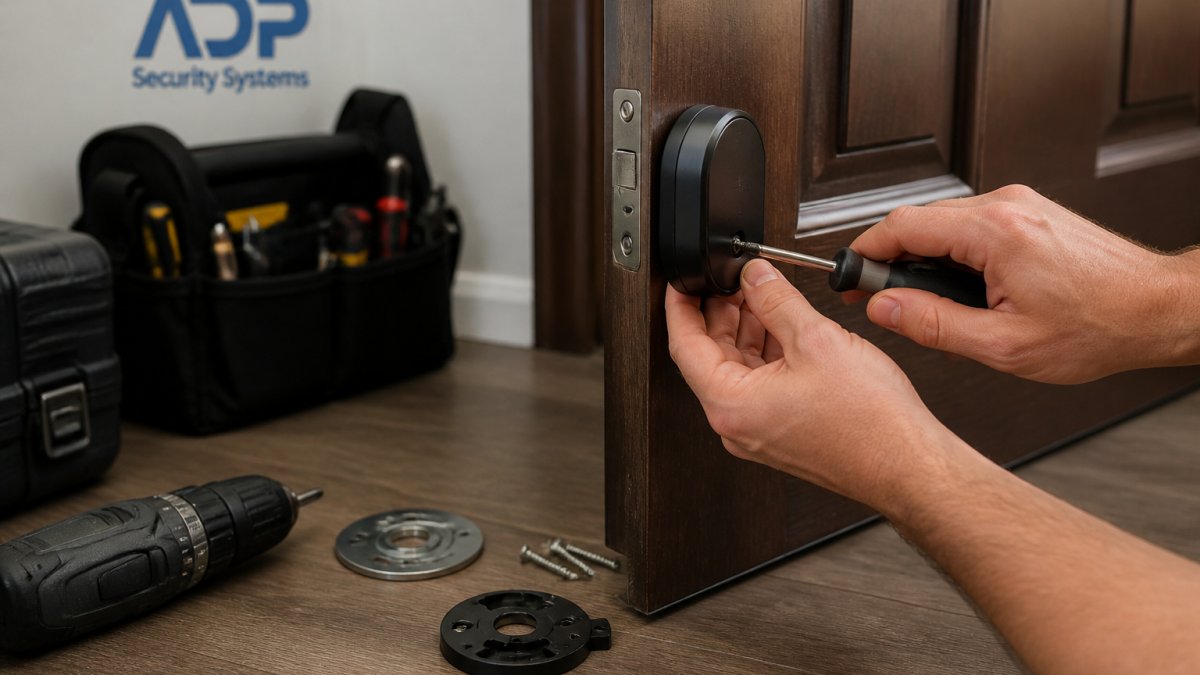
Tools you actually need
- A Phillips screwdriver that fits your existing deadbolt screws (a stubby driver helps in tight interior clearance)
- The adapter’s mounting plate and hardware
- A tape measure for the pre-install fit check
- Your phone with the manufacturer’s app installed and the lock charged or powered
- A pencil or painter’s tape to mark the plate position if the adapter instructions call for it
You do not need a drill, a chisel, or a hole saw. If a step in the instructions asks for one, stop and confirm you have the right model for your door.
Step-by-step fit check before you mount anything
- Lock and unlock the deadbolt by hand three or four times. The bolt should throw fully with light finger pressure and no grinding.
- Measure door thickness and backset and compare them to the adapter’s spec sheet.
- Hold the mounting plate against the interior trim without screwing it in. It should sit flat with no rocking and no gap at the edges.
- Dry-fit the adapter body over the thumb turn. Confirm the adapter’s grip engages the turn and that the body does not contact raised trim or the door frame.
- Rotate the thumb turn by hand through a full lock and unlock cycle while the adapter is in place. If the adapter binds or the turn slips, stop and adjust before powering on.
Step-by-step installation
- Remove the interior thumb turn per the manufacturer’s instructions. Keep the screws; you will reuse the mounting points on most retrofit units.
- Seat the mounting plate or adapter base against the interior trim and tighten it evenly. Do not overtighten, you can distort the plate and cause the motor to strain.
- Attach the lock body to the plate and confirm it is seated flush.
- Power on the lock and complete calibration in the app. Calibration teaches the motor the full lock and unlock travel; skipping it is the most common cause of partial throws.
- Test with the door open first, then closed, then locked from the exterior with your existing key. Confirm the key still works and the interior motor does not fight it.
Troubleshooting the three fit problems that actually happen
Misaligned door or strike plate. If the bolt rubs the strike plate when the door is closed, the motor has to overcome that friction on every cycle.
Stiff or binding deadbolt. A bolt that drags by hand will drain batteries and eventually stall the motor mid-throw.
Limited interior clearance. A storm door, a close sidewall, or a deep door frame can leave too little room for the adapter body.
Retrofit Smart Lock Wi-Fi: What Needs a Bridge and What Does Not
The practical difference shows up in battery life. Wi-Fi radios drain faster than low-power hub protocols, so built-in Wi-Fi units trade convenience for more frequent charging. Low-battery alerts help, but only if you act on them.
Security and Failure Modes Nobody Warns You About
Every retrofit introduces failure modes a mechanical deadbolt does not have. Batteries die. Bluetooth drops. Apps log you out. Motorized adapters can jam if the underlying bolt binds.
Encryption and access code management matter here. If your lock ties into a broader alarm or monitoring setup, integrating smart locks with security systems explains how the pieces talk to each other.
Renters, Shared Households, and Total Cost of Ownership
Renters should treat retrofit locks as the obvious choice. Our renter-friendly, no-drilling installation guide shows how to protect your deposit. Nothing touches the exterior, so nothing violates a lease.
Landlords and property managers juggling shared entries have a different calculus, since costs and code management scale across multiple doors and tenants. See our security system installation for rental properties guidance.
Total cost of ownership includes the lock, batteries, a hub if required, and your time. Our cost of upgrading existing security systems article gives real upgrade figures to compare against a retrofit.
Get Your Deadbolt Assessed Before You Buy
The right retrofit smart lock is the one that fits the deadbolt you already have. Measure first, check compatibility second, buy third.
If you would rather have someone confirm the fit before you spend anything, ADP Security Systems has served South Carolina for over 30 years.
Get started with ADP Security Systems and a free security assessment before you buy.
Frequently Asked Questions
Can I retrofit a smart lock to an existing deadbolt?
In most cases, yes. A smart lock retrofit attaches to the interior side of a standard single-cylinder deadbolt, so your exterior hardware and keys stay as they are. The main conditions are that the deadbolt turns smoothly, the door is at least 1-3/8 inches thick, and the backset measures 2-3/8 or 2-3/4 inches. Deadbolts that stick, have integrated handles, or use unusual trim may need a different approach, so check compatibility before ordering.
Can I still use my existing key with a retrofit smart lock?
Yes, key retention is one of the main reasons people choose a retrofit over a full replacement. Many retrofit designs leave the exterior keyway untouched, so your current key can keep working. Confirm the specific model supports your keyway before buying.
Do retrofit smart locks require a Wi-Fi bridge?
It depends on the model. Some retrofit locks have Wi-Fi built in, so you can lock and unlock remotely without extra hardware, while others rely on a separate hub. If remote access matters to you, check whether a model includes native Wi-Fi before buying.
How can I tell whether a retrofit smart lock will fit my door?
Measure three things: door thickness, backset, and deadbolt type. Door thickness should be at least 1-3/8 inches, and the backset, the distance from the door edge to the center of the deadbolt, should be 2-3/8 or 2-3/4 inches. Then confirm the deadbolt is a single-cylinder model that turns freely by hand. Photograph the interior trim and bring the measurements to a security professional if anything looks nonstandard.
Your door hardware is either ready for a retrofit or it is not, and guessing costs more than checking. Let ADP Security Systems confirm the fit, handle the installation, and keep the whole system monitored around the clock.