Fire Alarm Monitoring vs. Inspection for Businesses
June 11, 2026
Medical Alert Systems for Seniors: Home or Mobile?
June 12, 2026
Fall detection devices for seniors can shorten the time between a fall and a request for help, especially when an older adult cannot reach a phone or press a button. The right choice is not simply the device with the longest feature list. It is the one a senior will wear consistently, with dependable coverage and a clear response plan.
Explore ADP fall detection options for dependable support at home and away.
Falls remain a serious health concern for older adults. The Centers for Disease Control and Prevention reports that falls are the leading cause of injury for adults age 65 and older. About 300,000 older adults are hospitalized for hip fractures each year. Technology cannot prevent every fall. It can strengthen a broader safety plan that includes medical care, safer surroundings, appropriate exercise, and reliable communication.
How do fall detection devices for seniors work?
Fall detection devices use motion sensors and software to identify movement patterns associated with a fall. When the system detects a likely event, it initiates an alert and connects the user with a monitoring center or designated contact. The process is automatic, although users should press the help button whenever possible.
Most wearable devices use an accelerometer to measure changes in speed and direction. Some also use gyroscopes, barometric sensors, or location data. The software evaluates signals such as rapid downward movement, impact, orientation change, and inactivity. Because real-life falls vary, no detection system can identify every event with complete accuracy.
After detecting a possible fall, a monitored device typically gives the wearer an opportunity to respond or cancel a false alert. If the user needs assistance or does not respond, a monitoring professional can follow the account’s response plan, contact caregivers, or request emergency help. An ADP medical alert system can provide a direct connection without requiring the user to find a phone.
Automatic sensing is most valuable as a backup. Slow descents, slides from a chair, and falls cushioned by furniture may not create a recognizable sensor pattern. Users who remain conscious and able should press the help button rather than wait for an automatic alert.
Which type of device fits the senior’s routine?
The best device matches where the senior spends time and how independently they move through the day. In-home systems suit people who remain near a base station, while cellular and GPS wearables support trips beyond the house. Comfort, dexterity, charging habits, and willingness to wear the device should guide the decision.
In-home systems
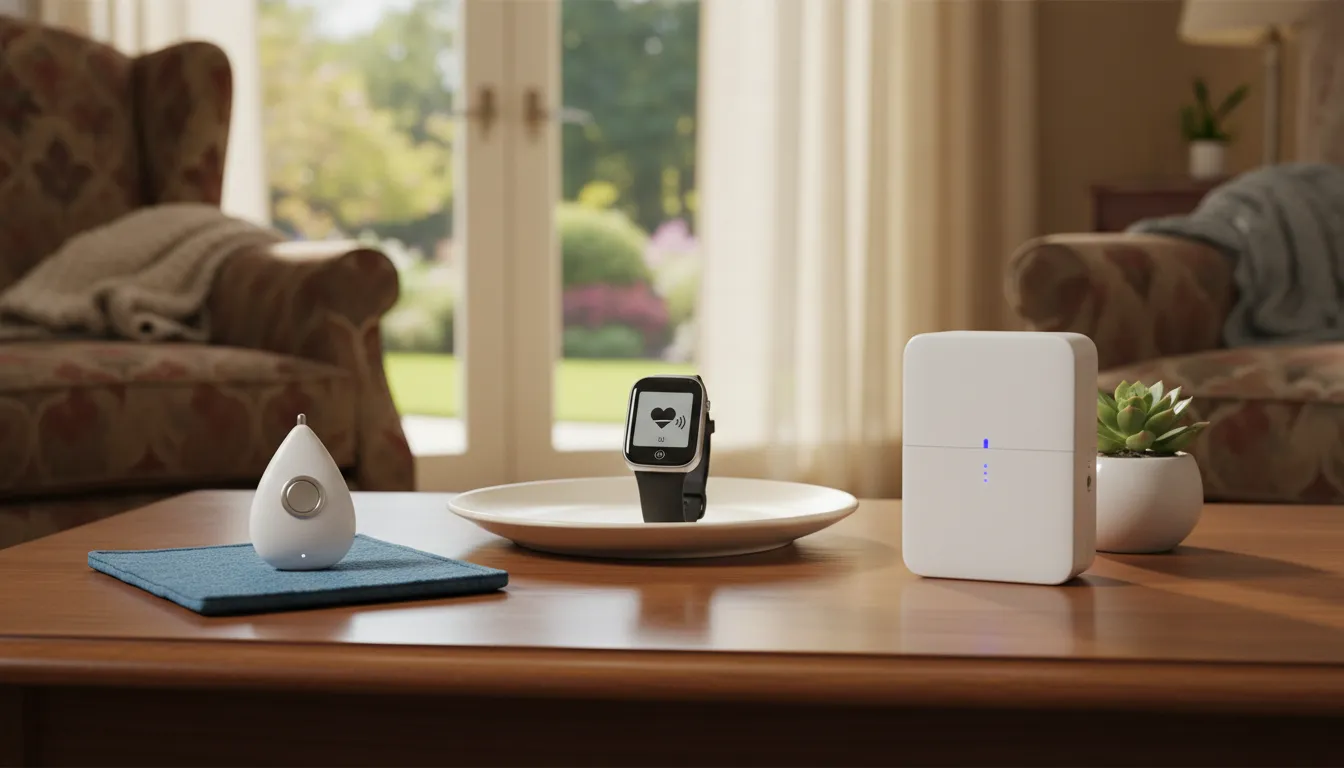
An in-home system usually combines a base station with a wearable pendant or wrist button. The base communicates with the monitoring center through a landline or cellular connection. Families should verify that the wearable signal reaches bedrooms, bathrooms, porches, garages, and the yard. A large or multi-level home may require wider coverage or additional buttons.
Mobile pendants and GPS watches
A mobile pendant or watch uses a cellular connection and may include GPS location services. It is a practical choice for someone who walks, shops, attends appointments, or visits family independently. A GPS-enabled medical alert watch can help responders locate the wearer when an emergency happens away from home.
Manual and automatic alerts
Every user should have an accessible help button. Automatic fall detection adds protection when the wearer cannot activate that button. For some households, wall-mounted buttons in high-risk areas can supplement a wearable. The strongest setup often combines automatic sensing, manual activation, and a documented response plan.
| Device type | Best fit | Primary consideration |
|---|---|---|
| In-home base and pendant | Primarily at-home routines | Test range throughout the property |
| Mobile pendant | Regular trips outside the home | Confirm cellular coverage and charging needs |
| GPS watch | Active users comfortable with a watch | Check location service and battery life |
| Wall help button | Supplemental coverage in key rooms | Must remain within reach |
Which fall detection features matter most?
Prioritize automatic sensing, professional monitoring, two-way voice, reliable coverage, water resistance, battery performance, and wearable comfort. These features influence whether an alert reaches the right person quickly and whether the senior uses the device every day. Extra functions have limited value if the core safety connection is unreliable or inconvenient.
Reliable monitoring and two-way voice
A monitored system provides a trained response point at any hour. Two-way voice allows the monitoring professional to ask what happened, confirm the user’s location, and follow the appropriate escalation plan. Ask how communication works if the user cannot speak and which information the center can share with emergency responders.
Coverage at home and away
Coverage should reflect the senior’s actual routine. Test an in-home unit at the edges of the property, not only beside the base station. For mobile equipment, review cellular performance in frequently visited areas around Greenville and elsewhere in South Carolina. Location services are useful only when connectivity and the account response process also work reliably.
Water resistance
Many people remove electronics before bathing, which can leave a gap in protection. Select a wearable specifically rated for its intended water exposure and follow the manufacturer’s instructions. Do not assume that labels such as water resistant and waterproof mean the same thing. Confirm whether showering, bathing, or brief submersion is permitted.
Battery life and charging
A device cannot send an alert when its battery is depleted. Compare typical battery duration, charging time, low-battery notifications, and whether the monitoring center or caregiver receives a battery warning. Consider the user’s routine honestly. A device that requires frequent charging may not suit someone who regularly forgets to place it on a charger.
Comfort and ease of use
The device should be comfortable enough to wear throughout the day and simple enough to operate under stress. Evaluate weight, button size, clasp design, skin sensitivity, speaker volume, and whether the wearer prefers a pendant or watch. The best technical specification does not compensate for a device left on a bedside table.
Setup, training, and ongoing support
Installation is an opportunity to confirm coverage, teach the user, and correct misunderstandings before an emergency. Ask whether the provider assists with activation, account setup, contact lists, and device testing. A senior and at least one caregiver should understand how to place a call, cancel an accidental alert, charge the wearable, and report a problem. Families reviewing personal emergency response options should also confirm where technical support is based and when it is available.
False alerts can occur during normal activity. They should be treated as a reason to review fit, placement, and provider guidance, not a reason to stop wearing the device. Make sure the senior knows that responding to the monitoring professional is enough to resolve most accidental activations. A clear orientation to connected senior safety technology can improve confidence and help make the system part of a normal routine.
Discuss a practical senior safety setup with ADP Security Systems.
How should families compare monitoring and response?
Families should compare who receives an alert, how quickly a live professional responds, what happens when the user cannot answer, and how caregivers are notified. A reliable device is only one part of the system. Monitoring procedures, current account details, and a clear escalation plan determine what happens after an alert.
Some devices notify only a family member through an app or call. That approach may work for certain households, but it depends on the contact being available immediately. Professional monitoring adds a staffed response path around the clock. Families considering professionally monitored senior care should ask how operators verify an alert and when they contact emergency services.
Provide accurate contact information, the home’s address, access instructions, medical details requested by the provider, and an ordered list of caregivers. Review this information whenever phone numbers, medications, mobility, or living arrangements change. For a mobile device, confirm how a monitoring professional determines location and what occurs if GPS is unavailable.
Caregiver notifications can keep family members informed, but they should support rather than complicate the response. Decide in advance who should receive routine alerts, battery warnings, and emergency notifications. A concise plan reduces confusion during a stressful event.
Response time is more than the time required to answer an alert. It also includes confirming the situation, finding the user, reaching a caregiver or emergency service, and providing useful account information. Ask providers to explain that full workflow. A senior monitoring solution should make responsibilities clear before the first emergency, not during it.
How can you test a system before relying on it?
Test the help button, two-way voice, home range, mobile connection, location service, caregiver notifications, and battery alerts before depending on the system. Follow the provider’s instructions and tell the monitoring center that the activation is a test. Repeat checks periodically and after equipment, internet, phone, or household changes.
Begin with an assisted test so the senior can practice pressing the button and speaking with the monitoring professional. Confirm that the operator sees the correct account information and follows the intended contact plan. Never stage a physical fall to test automatic detection. Ask the provider for its safe testing procedure instead.
For an in-home device, activate the button from every important area, including bathrooms, bedrooms, stairs, the porch, and the yard. Listen for clear audio and confirm that the base receives the signal. For mobile devices, test during normal outings and review whether the location reported to the center is useful.
Include charging and maintenance in the test plan. Verify low-battery warnings, inspect the wearable and charging cable, and keep the device clean according to manufacturer directions. A recurring monthly reminder can help families review the system without making safety checks burdensome.
How should cost and coverage be evaluated?
Evaluate the total cost of equipment, activation, monitoring, fall detection, cellular service, location features, replacement, and cancellation terms. Pricing varies by provider and device type, so request a written quote for the complete setup. Insurance coverage is inconsistent, and families should verify benefits directly with their plan before purchasing.
The lowest advertised monthly rate may exclude automatic fall detection, GPS, equipment, or activation. Ask for the recurring monthly total and every one-time charge. Also confirm trial periods, return policies, contract length, repair terms, and what happens if the senior moves or no longer needs the service.
The National Council on Aging’s fall detection system guidance notes that automatic fall detection commonly costs extra. Original Medicare generally does not cover medical alert systems, although some Medicare Advantage plans may offer related benefits. Contact the plan directly to verify eligible products, approved suppliers, allowances, and ongoing monitoring coverage.
Cost matters, but value depends on consistent use and an effective response. A well-fitted device with dependable monitoring may be more useful than a less expensive product the senior will not wear. Compare proposals using the same required features rather than comparing headline prices alone.
Also ask what is included after purchase. Useful service may include onboarding, periodic tests, caregiver account updates, troubleshooting, and replacement procedures. If a feature is optional, verify whether it can be added later and whether doing so changes equipment or contract terms. A written comparison prevents surprises and gives the senior a meaningful role in choosing among monitored fall alert solutions.
How can families choose with confidence?
Start with the senior’s routine, risks, preferences, and ability to manage the device. Then compare a short list using the same criteria: coverage, automatic detection, monitoring response, comfort, water rating, battery needs, testing process, and total cost. Involve the senior throughout the decision so the final choice supports independence.
- Map the routine. Identify where the senior spends time, including rooms, outdoor areas, regular destinations, and trips beyond Greenville.
- Identify practical risks. Review mobility, prior falls, bathroom safety, stairs, medications, vision, hearing, and any concerns with a healthcare professional.
- Choose a wearable format. Let the senior try pendant and watch options when possible. Confirm that the help button is easy to find and press.
- Compare response plans. Understand who answers, what they can see, how they locate the user, and when they call family or emergency services.
- Verify the full price. Request all monthly and one-time charges in writing, including optional fall detection and cellular features.
- Test and review. Practice using the system, update account details, and schedule periodic checks.
Fall detection should complement, not replace, a broader fall prevention plan. The CDC recommends discussing fall risks with a healthcare provider, reviewing medicines, checking vision and feet, doing appropriate strength and balance activities, and making the home safer. When those steps are paired with dependable communication, seniors and families gain a more complete layer of protection.
Frequently asked questions
Can fall detection devices detect every fall?
No. Automatic fall detection can miss slow or low-impact falls, and normal movement can occasionally trigger an alert. A senior who is able to respond should always press the help button after a fall. Automatic detection is an important backup, not a guarantee.
Should a fall detection device be worn in the shower?
Yes, if the manufacturer specifically rates the device for shower use. Bathrooms are a high-risk area, so water resistance is a practical priority. Confirm the rating, permitted water exposure, and care instructions before relying on a pendant or watch in the shower.
Does Medicare pay for fall detection devices?
Original Medicare generally does not cover medical alert systems. Some Medicare Advantage plans may offer a device or allowance as an extra benefit. Coverage varies, so families should contact the plan directly and ask about eligible equipment, monitoring fees, suppliers, and renewal rules.
Is GPS necessary for a senior who lives alone?
GPS is most useful for seniors who leave home independently. It can help a monitoring professional or emergency responder locate the user away from the base station. A person who remains at home may be better served by reliable in-home coverage and strategically placed help buttons.
Choosing among fall detection devices for seniors is ultimately a decision about fit, trust, and response. Focus on equipment the senior will wear, verify that it works wherever they spend time, and make sure everyone understands what happens after an alert.
Contact ADP Security Systems to compare fall detection and medical alert options.